
Welcome to the release of LogRhythm SIEM version 7.25! This release contains integration and workflow enhancements designed to maximize analyst productivity, simplify data compliance, and streamline security operations. With the new LogRhythm Intelligence Sync Service, you can bridge the gap between LogRhythm SIEM alarms and New-Scale cases, keeping critical risk scores and status updates synced in real time within the alarm interface to eliminate "swivel-chair" workflows. We have also introduced new endpoints to the AI Engine (AIE) API that give users more control over their rule blocks and filters, allowing for greater oversight into the AIE workflow. Additionally, analysts can now add logs directly to cases from Data Indexer (DX) dashboards, a feature that was, until now, restricted to Events Dashboard users. This release also introduces the Archive Engine, which routes a copy of all generated AI Engine Events into the standard LogRhythm archiving service for enhanced data collection and retention. The LogRhythm Open Collector has also received major enhancements, including the new Box Beat and expanded Mimecast log collection. With LogRhythm SIEM version 7.25.0, significantly reduce the time required to detect, investigate, and document security threats while keeping your long-term data securely archived.
What’s new in LogRhythm SIEM 7.25:
Maintenance
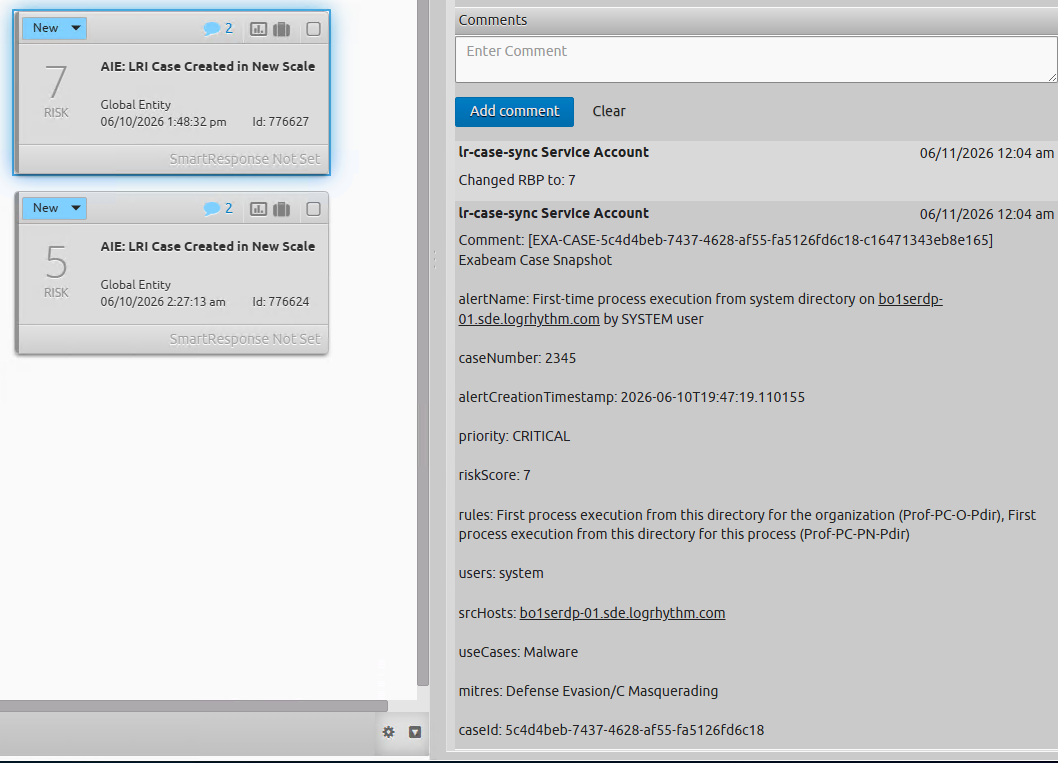
LogRhythm Intelligence Sync Service
To eliminate interface switching and prevent stale security alerts, the LogRhythm SIEM 7.25.0 release introduces a new, standalone synchronization service that bridges the gap between New-Scale cases and LogRhythm SIEM alarms. Operating as an independent background service, it correlates SIEM alarms with New-Scale cases using the Vendor Message ID field. Upon initial match, the service injects a curated, formatted summary of the case details directly into the LogRhythm SIEM alarm's comments section. During subsequent configured sync intervals, the service automatically appends comments to document modifications (such as changes to risk scores, assignment, or statuses), establishing a clear audit trail. Administrators can configure authentication credentials, sync intervals, and specify exactly which fields sync, including the option to append the Exabeam Nova case summary. Additionally, the service leverages LogRhythm APIs to programmatically map and update SIEM alarm statuses and Risk-Based Prioritization (RBP) to match state changes in the associated New-Scale case.
For more information on this new LogRhythm Intelligence enhancement, refer to LogRhythm Intelligence Sync Service.
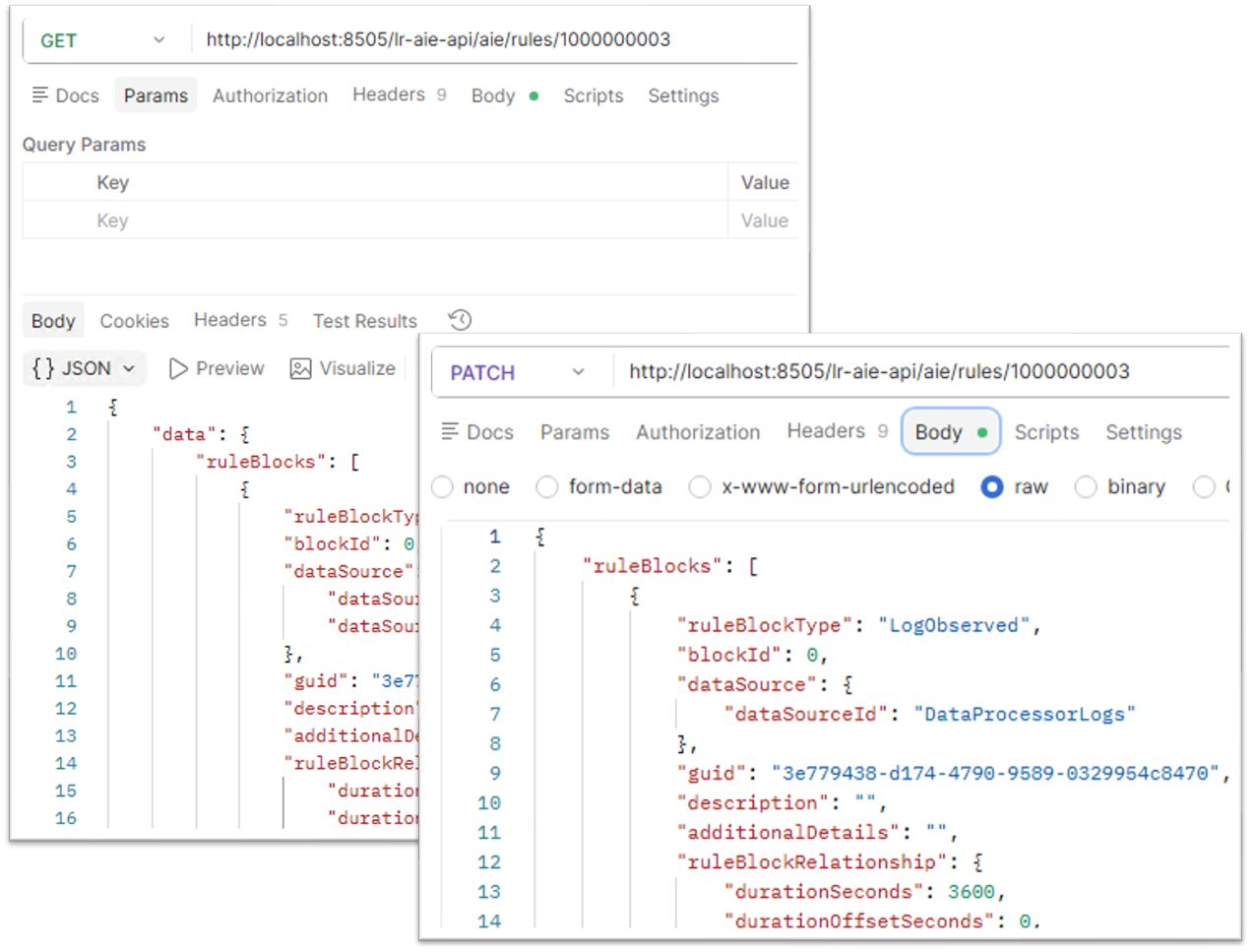
AIE API: Rule Block Management
The AI Engine API has been expanded to support management of AIE Rule Blocks, allowing users to retrieve and modify rule blocks and filters directly. This enhancement helps security teams automate the deployment of standard rule baselines across multiple tenants for dynamic alert tuning.
For more information on Rule Block Management via the AI Engine API, refer to the LogRhythm API Documentation.
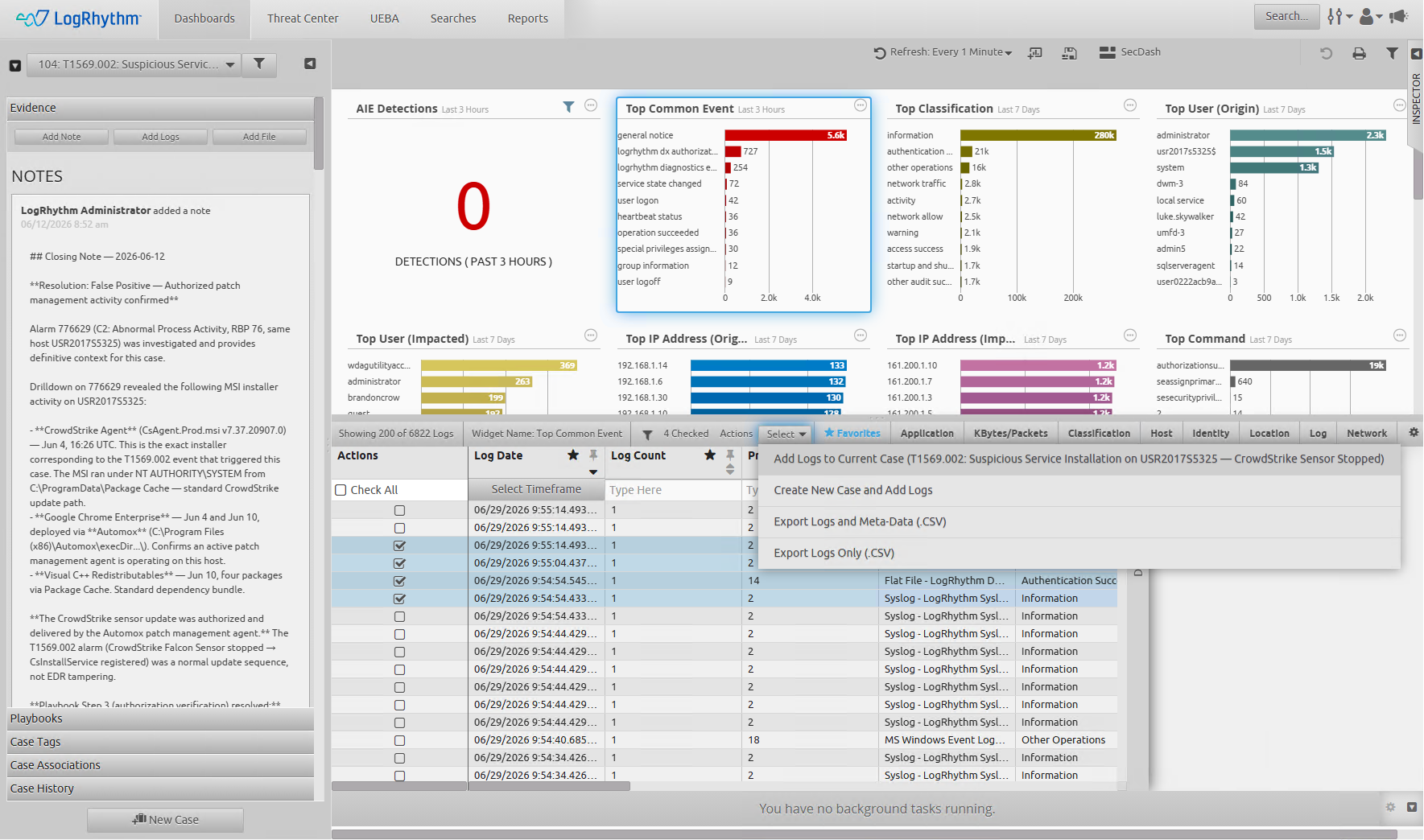
DX Dashboard Case Enhancements
This release introduces the "Add Logs to Case" capability within Data Indexer (DX) dashboards. Security analysts can now seamlessly attach log data to either new or existing cases without leaving their primary dashboard view. This functionality is fully operational from both the main data grid via an "Add to Case" option available when selecting one or more log rows, and from within the Case Inspector Panel. This feature ensure robust, error-free processing when transferring groups of logs to the case management system.
For more information on Case Management within the Web Console, refer to Case Management.
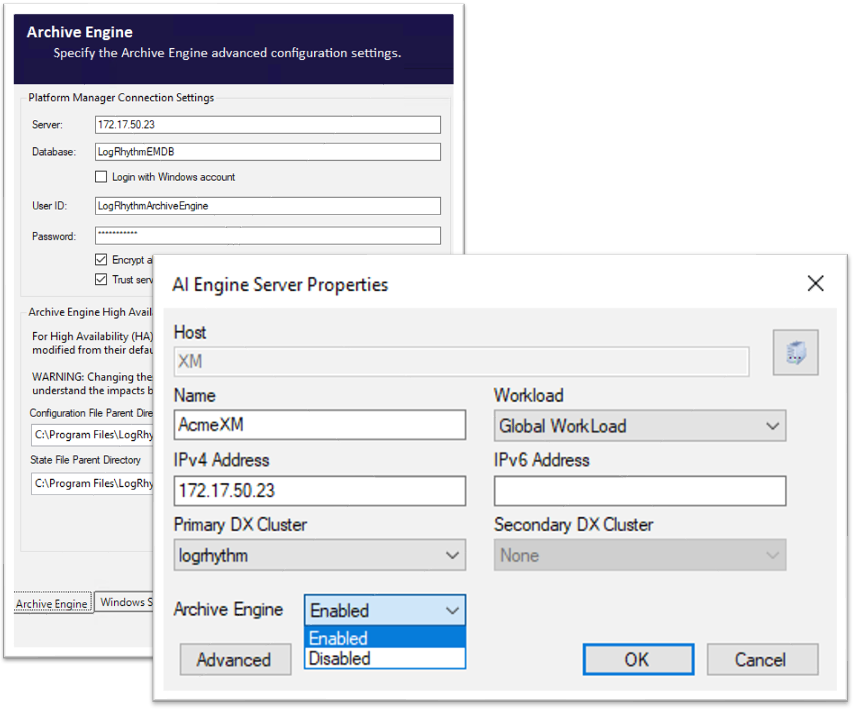
LogRhythm Archive Engine
The LogRhythm Archive Engine ensures that all AI Engine (AIE) Events are automatically captured in your standard archiving pipeline for long-term retention and compliance. Previously, AIE Events bypassed the archiving service entirely, creating a gap for organizations with data retention mandates. With this release, every AIE Event generated by the LogRhythm SIEM is now preserved alongside your log data in the daily archive files.
This enhancement guarantees that your most critical security detections (alerts, correlations, and automated responses) are securely retained and easily retrieved using SecondLook for compliance audits and forensic investigations. By unifying all security data into a single archiving strategy, you can meet retention policies, conduct long-term threat hunting, and ensure comprehensive data governance across your deployment.
For more information, refer to Configure the Archive Engine Service.
Open Collector New Beat and Beat Enhancements
This release modernizes our collection frameworks for both the Box and Mimecast platforms. We have introduced a new Box Open Collector Beat to replace the deprecated legacy System Monitor Agent API collector. This modernized Box integration establishes secure API authentication via OAuth 2.0 with JWT and automatically parses and maps Box event logs directly to the LogRhythm schema, offering a significantly simplified onboarding process.
Additionally, we have expanded our Mimecast collection capabilities to deliver feature parity with New-Scale cloud collectors. LogRhythm can now ingest highly granular Mimecast data streams, including Archive Search, TTP Attachment Protection, TTP Impersonation Protect, TTP URL, Archive Message View, and Audit logs, providing security teams with comprehensive visibility across their cloud communication ecosystems.
For more information on these new Open Collector features, refer to the Open Collector Release Notes.
LogRhythm System Monitor 7.25.0
Starting with the 7.25.0 release in July 2026, LogRhythm System Monitor release notes have been combined into the main LogRhythm SIEM release notes. Going forward, all release updates for System Monitor can be found here in the LogRhythm SIEM GA release notes.
|
Software Component |
|
|---|---|
|
Version Number |
7.25.0 (Windows) 7.25.0 (*NIX) |
|
Compatibility |
This System Monitor Agent release is compatible with LogRhythm SIEM core versions that have not reached their end of life date. For more information, see End of Life Policies for Software and Hardware.
|
LogRhythm System Monitor Agents for Windows require the Microsoft .NET Framework 4.7.2+ or .NET Core 8.
-
Before upgrading your System Monitor Agent .NET Framework 4 agent (installed pre-7.21), confirm that .NET Framework 4.7.2 or higher is installed.
-
For information on determining which .NET version is installed, see Determine which .NET Framework versions are installed - .NET Framework.
-
If an older version of .NET Framework 4 is installed, install .NET Framework 4.7.2 or higher and reboot your system during a planned maintenance window. Upgrading a .NET Framework 4 agent when the version of .NET Framework is older than 4.7.2 will trigger a reboot.
-
Upgrading existing .NET Framework 4 System Monitor Agents to .NET Core 8 (7.21 or later) should not require a reboot, but should be done during a planned maintenance window.
.NET Agent Upgrade Packages Issue
System Monitor Windows Agent versions 7.22.0 and later come with a new .NET 8 agent update package to address an issue with agent upgrades. This package includes all of the following necessary files for the update:
-
windowsdesktop-runtime-8.0.18-win-x64/86.exe
-
LRSystemMonitor_64_7.xx.0.2033.exe
-
LRAgentUpdate.exe
-
Property.xml
This fix simplifies upgrades for users on versions 7.22 or later moving to a newer/future version (like the 7.25 .NET 8 agent). If you are on an older version of System Monitor Agent (7.21 or earlier), this fix is not available, and you will need to follow the special instructions below.
To update to the latest Windows System Monitor Agent version (7.25.0.2xxx .NET 8), follow these two steps:
-
Run the upgrade packages for System Monitor Agent version 7.25.0.1xxx (.NET 4) from any previous versions.
-
After that, run the upgrade package for System Monitor Agent version 7.25.0.2xxx (.NET 8).
Special Instructions for Customers on Windows System Monitor Agent Version 7.21 or Earlier
Customers on Windows System Monitor Agent version 7.21.0.2019 (.NET 8) cannot directly upgrade to agents 7.22.0.1xxx (.NET 4) or 7.22.0.xxx (.NET 8) or later using a manual or package upgrade. Follow these steps:
Manual upgrade steps:
-
Uninstall the old System Monitor Agent version 7.21.0.2019 (.NET 8) completely.
-
Install the new System Monitor Agent version 7.25.0.2xxx (.NET 8) or 7.25.0.1xxx (.NET 4).
Upgrade package steps:
-
Run the upgrade package for the 7.21.0.1052 or older .NET 4 agent.
-
Run the package for the 7.25.0.1xxx (.NET 4) agent.
-
Run the package update for the 7.25.0.2xxx (.NET 8) agent.
Log Source Enhancements and Updates
LogRhythm SIEM 7.25 introduces updates designed to enhance the speed, consistency, and compatibility of data collection with third-party platforms. These enhancements include:
-
New log sources based on customer requests and feedback.
-
Improvements around Forcepoint log source collection.
New and Updated Log Sources
This past quarter of bi-weekly LogRhythm SIEM Knowledge Base updates included 34 enhanced or improved log sources, and 11 newly introduced log sources. This allows customers to expand their security capabilities by increasing log visibility within the LogRhythm SIEM.
The following log sources have been added or updated:
|
New Log Sources |
Updated or Improved Log Sources |
||
|---|---|---|---|
|
|
|
|
Platform Updates
LogRhythm 7.25 is packed with platform updates to improve security, performance, and stability. Spend more time hunting for threats and less time managing the platform.
Dependency Updates
As part of our ongoing commitment to maintaining third-party dependencies for stability and security improvements, the following packages have been updated:
-
Data-Indexer Java Corretto JRE updated to version 8.0.492,
-
Web-Indexer Java Corretto JDK updated to version 21.0.11,
-
.NET 8 Core updated to version 8.0.28,
-
Grafana updated to version 12.4.3+security-02,
-
Electron has been updated to version 39.6.1 for True Identity Sync Client, and
-
NodeJS Updates to API Gateway, Authentication API, Web Console API, and Web Console UI to 22.22.3.
Smart Response Plugin (SRP) Updates
The following Smart Response Plugins have received updates alongside the release of LogRhythm SIEM version 7.25:
-
Fortinet Fortigate v4.0
-
Carbon Black Cloud v4.0
For LogRhythm SRP guides and downloads, refer to the LogRhythm Community.
LogRhythm Diagnostics Tool Version 3.5.0
Version 3.5.0 is a complete rewrite of the LR Diagnostics Agent, LR Diagnostics UI, and LR Diagnostics backend, introducing the following major changes from version 2.4.0:
-
A new, lightweight UI with a simplified and refreshed user interface, making it easier to use.
-
Service mesh integration to automatically discover remote Diagnostics Agent instances from LogRhythm Service Registry. No manual IP, port, or certificate configuration is required on LogRhythm SIEM version 7.25+.
-
A Platform Sizing tab to provide a full analysis engine that covers DP utilization, AIE engine power, DX cluster sizing, and N-1 redundancy recommendations. Exports to HTML and Excel.
-
An AIE Performance tab to fast-path AIE analysis without a full sizing run. Includes per-rule and per-block metrics, rule change audit, slow/costly/noisy rule rankings, stale block detection, and spooling charts. The tab also exports to HTML.
-
An MPE Performance tab that fetches the
lps_detail_snapshot.logfrom each DP agent via service mesh and ranks MPE rules by volume-weighted CPU cost. The tab also exports to HTML. -
A Platform Health tab that displays database stats, service status, disk utilization, and overall system health. The tab also exports to HTML.
-
An Export Logs tab discovers all Diagnostics Agent instances via Service Registry and downloads logs and service status as per-node ZIP archives.
-
A Hardware Health tab provides high-level hardware heath and inventory data, along with the ability to gather Disk Status and Generate/Export TSR reports.
For more information on the new and improved diagnostic tool, refer to LogRhythm Diagnostics Tool.
LogRhythm Echo
LogRhythm Echo has been updated to version 2.0.12 as part of the LogRhythm SIEM 7.25.0 release. This release includes various defect fixes to enhance the stability of the Echo service.
For more information on this release, refer to LogRhythm Echo.
LogRhythm Threat Intelligence Service
The Threat Intelligence Service has been updated to version 1.9.9 as part of the LogRhythm SIEM 7.25.0 release. This release includes numerous defect fixes to enhance the Threat Intelligence Service experience.
For more information on this release, refer to Threat Intelligence Service Release Notes.
LogRhythm TrueIdentity Sync Client
The TrueIdentity Sync Client has been updated to version 1.7.0 as part of the LogRhythm SIEM 7.25.0 release. This release includes security-related defect fixes to enhance the Sync Client’s stability and security.
For more information on this release, refer to TrueIdentity Sync Client Release Notes.
Deprecation Notices
-
Linux System Monitor Agents were moved to .NET 8 in LogRhythm SIEM version 7.23.0. LogRhythm SIEM version 7.24.0 was the last version for which maintenance activities took place against the older builds (versions ending in 1xxx like 7.19.0.1000). Customers should migrate to updated .NET 8 System Monitor Agents for the best, most up-to-date features and defect fixes. The older agents will continue to function; however, maintenance for those agents ceased starting with the 7.24.0 release. Any customers reporting defects with older System Monitor Agents will be asked to migrate to the .NET 8 agent builds (ending in 2xxx like 7.24.0.2000).
-
Data Indexer support for CentOS and RHEL 7 ended with LogRhythm SIEM version 7.22. Refer to the Notice of Deprecation section in the LogRhythm SIEM version 7.22.0 release notes for additional details.
Resolved Issues & Improvements
The following issues have been resolved either via a defect fix or a platform improvement in LogRhythm SIEM 7.25.
|
Bug # |
Component |
Description |
|---|---|---|
|
ENG-53211 |
Client Console |
Windows Host Wizard now includes PowerShell, Windows Defender, Sysmon, and WMI in auto-detection for modern Windows hosts. Additionally, the manual log source type list has been updated, and the cache policy has been corrected to prefer LogRhythm Default v2.0. |
|
ENG-57134 |
Web Console |
Resolved an issue in which users were shown an incorrect “password reset successfully!” in certain situations when attempting to reset the password of users that they did not have the authority to reset. |
|
ENG-60300 |
AI Engine |
An issue that was preventing AI Engine from reliably starting after a Disaster Recovery failover has been resolved. |
|
ENG-60833 |
Admin API |
An issue in which the documented Max Name Length for certain fields was not consistent across the API, console, and SQL has been resolved. |
|
ENG-61093 |
Agents |
A new appSetting has been added to Agent configuration files: AutoCorrectionMSEvtPosLogicV2. This setting has restored functionality that was handled by the previous setting AutoCorrectionMSEvtPosLogic, which couldn’t be adjusted during an Agent upgrade. Setting this option to “true” ensures that the position of collected Windows Event Logs is not reset, which could cause a breakdown in the flow requiring manual correction. |
|
ENG-63653 |
SmartResponse Plugins (SRPs) |
The Carbon Black Cloud SRP has been updated to v4.0, which updates previously deprecated API parameters, allowing the SRP to function as expected. |
|
ENG-67395 |
AI Engine |
Updated a UI label for AIE rule block exclusion filters to correctly show SQL pattern match instead of Regex. |
|
ENG-69521 |
Agents |
An issue with resolution authentication that was causing Agent lookup failures by using incorrect credential handling has been resolved. |
|
ENG-69777 |
Alarming and Reporting Manager (ARM) |
In the event that the Alarms DB is down and alarms are missed, the ARM now spools these alarms for when the Alarms DB is restored. |
|
ENG-70916 |
SecondLook |
The SecondLook “Maximum Log Messages to Recover” setting has been renamed to “Maximum Archive Logs to Process” to more accurately reflect the intended functionality of the setting. |
|
ENG-73729 |
AI Engine |
The AIE Drilldown service now only queries online repositories to prevent timeout/failure when attempting to query offline repositories. |
|
ENG-74067 |
Mediator |
When a log source is retired, the associated archive (.lua) file is now correctly sealed and marked as inactive. |
|
ENG-74254 |
SmartResponse Plugins (SRPs) |
The Fortigate SRP has been updated to v4.0, which updates the API to token-based authentication, as the API authentication previously used by the SRP has been deprecated. |
|
ENG-74828 |
Log Sources |
Resolved an issue in which silent log source options were editable on child log sources; child log sources inherit silent log source options from the parent log source. |
|
ENG-79183 |
Reporting |
A number of LogRhythm Reports, including the Audit Log report, have been updated to generate without a dependency on the SQL Native Client, which was discontinued in SQL 2022. |
|
ENG-79892 |
Agents |
The log severity of rejected System Monitor Agents has been lowered from “error” to “info” in order to prevent repeated unnecessary error messages from filling the event log file. |
|
ENG-80849 |
High Availability (HA) Deployments |
When using one shared host record for both the Agent and PM services in a High Availability setup, the system no longer overwrites IP information during a failover between HA nodes. |
|
ENG-83529 |
Search |
An issue that was allowing users who are not allowed to share searches with “Public All Users” to do so via a workaround has been resolved. |
|
ENG-85108 |
Web Console |
Web Console Services Host API now handles Web Indexer Queue exhaustion conditions to be more reliable and reduce instances of service restarts, failed searches, and inconsistent alarm data across multiple web console deployments. |
|
ENG-85500 |
Windows Host Wizard |
Resolved an issue that was preventing the Windows Host Wizard from successfully querying IP addresses using the Hostname. |
|
ENG-85501 |
Web Console |
An issue that was preventing the Country (Impacted) and Country (Region) filters from returning correct information in various areas of the Web Console (search, widgets, etc.) has been resolved. This defect fix may cause wildcard Lucene filters from LogRhythm SIEM versions 7.20 - 7.24 to function as they did prior to version 7.20. Wildcard Lucene filters should not use “quotes.” If you experience blank widgets or dashboards post-upgrade, please review your filters and remove any quotes from wildcards: Invalid: classificationName:"Access*" Valid: classificationName:Access* |
|
ENG-86420 |
Data Indexer |
Resolved an issue in which logs that had text larger than 32KB parsed into keyword fields would not be indexed. These logs now have text truncated to 32KB so that the log can be indexed while the entire raw log is still indexed in the Log Message field. |
|
ENG-86462 |
Agents |
An issue that was causing a .NET8 agent’s scsm.log file to produce “Newtonsoft” error messages repeatedly has been resolved. |
|
ENG-86570 |
Web Console |
Resolved an issue in which attempting to view a Web Console “shared search” was not functioning properly when the user had to reauthenticate. |
|
ENG-87292 |
Log Sources |
Accepting a syslog using relay regex now correctly routes the log without requiring manual hostname changes. |
|
ENG-87565 |
Message Processing Engine (MPE) |
Alarms are no longer incorrectly triggered for MPE Null Log Sources. |
|
ENG-87861 |
Admin API |
Retiring a host via the Admin API now correctly automatically retires all of the associated host identifiers as part of the same operation. |
|
ENG-88659 |
Agents |
Resolved an issue that was causing numerous “Agent Heartbeat Missed” alarms to trigger during Daylight Savings changes by enforcing UTC time for all Agent timing calculations. |
|
ENG-88893 |
AI Engine |
Resolved an issue that was preventing the AI Engine service from restarting successfully after multiple AIE rule updates or when the SQL server is under duress. |
|
ENG-89137 |
Agents |
Updated the default policy settings for System Monitors to more closely match the default settings for individual agents, preventing potential agent performance degradation and error generation. |
|
ENG-89370 |
Admin API |
Updated the Admin API to allow agent renaming even when multiple agents are associated with the same host record. |
|
ENG-89754 |
Client Console |
Resolved an issue in which Data Masking rules were allowing duplicate “Find” expressions within a single rule. |
|
ENG-89928 |
Windows Host Wizard |
The Windows Host Wizard now defaults to modern XML log source types (such as MS Windows Event Logging XML) for unknown Windows versions. |
|
ENG-90116 |
JSON Parser |
Resolved an issue with log message truncation that was resulting in large JSON messages being truncated incorrectly when indexed. |
|
ENG-91836 |
Data Indexer |
The Data Indexer now enforces a hard limit to prevent uncontrolled memory growth in poor performing DX clusters. |
|
ENG-92093 |
Admin API |
The Admin API has been updated to normalize all list values to lowercase during storage and comparison, preventing duplicate entries and matching Client Console behavior. |
|
ENG-92262 |
Admin API |
Resolved an issue in which the Admin API could retire an active host even if the host was referenced by an active System Monitor, log source, meditator, or ARM. |
|
ENG-92531 |
Case API |
Resolved an issue in which the LogRhythm Case API was lacking certain stored procedure permissions. |
|
ENG-92739 |
AI Engine |
Additional logging details have been added to the AI Engine for troubleshooting Host Inference Token issues. |
|
ENG-93239 |
Admin API |
Updated the Admin API so that when creating custom sub-rules using the mperules endpoint, undefined Mapping Tags default to a match value of “Anything,” matching the behavior of the Client Console. |
|
ENG-93242 |
Admin API |
Resolved an issue in which users could not add the MapVMId tag when creating a subrule with the Admin API mperules endpoint. |
|
ENG-93321 |
Admin API |
Resolved an issue in which the Create New MPE Rule endpoint’s defMsgArchiveMode parameter was not accepting the default value of 2. |
|
ENG-93650 |
Client Console |
Updated the Client Console to support up to 10,000 characters in the Event Log Filter (Query) text box when configuring XPath Filters for Windows log sources. |
|
ENG-93682 |
JSON Policy Builder |
Resolved an issue in which attempts to add multiple fields to a JSON value in the Policy Builder resulted in the deletion of the initial mapping. Now, a pop-up confirms whether the existing mapping should be updated or a new mapping added. |
|
ENG-93683 |
JSON Policy Builder |
Resolved an issue that was preventing users from searching for LR Schema fields in the JSON Policy Builder. |
|
ENG-93698 |
AI Engine |
The Rule Builder “Log Not Observed” compound rule block no longer generates false alarms in certain situations. |
|
ENG-93726 |
High Availability (HA) Deployments |
An issue in which the HA upgrade script would fail on Windows Server 2022 by throwing an LKSQL error in certain situations has been resolved. |
|
ENG-93791 |
Web Console |
The “Load Latest” button no longer incorrectly appears in new search results without any new logs to load. |
|
ENG-94517 |
AI Engine |
Resolved an issue in which AI Engine-generated events carried the incorrect MsgSourceId and MsgSourceHostID, which was preventing accurate attribution to the originating AIE server. |
|
ENG-94698 |
SecondLook Search |
Resolved an issue in which SecondLook Search was showing incorrect results after a restoration. |
|
ENG-94711 |
Disaster Recovery (DR) Deployments |
An issue in which users would receive a “This Windows account is not present as a sysadmin” error in certain situations during the DR failover process has been resolved. |
|
ENG-94776 |
High Availability and Disaster Recovery (HADR) Deployments |
An issue in which the HA+DR setup process would incorrectly fail pre-check validation with an “insufficient permissions” error in certain situations, even when the user had valid privileges, has been resolved. |
|
ENG-95052 |
Agents |
Resolved multiple issues that were causing Syslog - Trend Micro Deep Security CEF log sources to stop reporting. |
|
ENG-96386 |
Web Console |
Resolved an issue in which attempting to open the “Cases” tab after opening a case in a new browser tab was throwing an error. |
|
ENG-97272 |
Search API |
Resolved an issue in which the Search API was incorrectly routing default search behavior through SQL instead of the Data Indexer in certain situations. |
|
ENG-97583 |
SecondLook |
Resolved an issue in which the SecondLook service was throwing errors in certain situations when installed on standalone Web Console or AI Engine hosts. |
|
ENG-97587 |
Admin API |
Resolved an issue in which returning large numbers of logs (10k+) in the API resulted in duplicate logs in certain situations. |
|
ENG-97991 |
TrueIdentity Sync Client |
Resolved an issue in which the TrueIdentity Sync Client would time out in certain situations in environments with large numbers of users. |
|
ENG-98415 |
Admin API |
Resolved an issue in which the Admin API was not correctly encrypting Event Log credentials prior to storing within SQL in certain situations. |
|
ENG-99276 |
Web Console |
Resolved the following issues with Lists in the Web Console:
|
Resolved Issues - Security
Security-related issues resolved with this release are available for customers to view in the Community.
Known Issues
The following issues have each been found and reported by multiple users.
|
Bug # |
Found In Version |
Components |
Description |
Notes |
|---|---|---|---|---|
|
ENG-102107 |
7.25 |
Client Console
|
AIE Rules with regex filters modified using the Client Console in LogRhythm SIEM version 7.25 may not be correctly processed by the AI Engine. |
Expected Results: AIE Filters using regex patterns for non-lists should filter as configured in rule processing Workaround: Avoid modification of AI Engine rules using the 7.25 Client Console. Open a case with Customer Support and reference issue ENG-102107 for a dev binary. |
|
ENG-88451 |
7.22 |
Web Console UI |
Customers running multiple web consoles or multiple tabbed user sessions may experience issues where scroll events can cause the mega-grid to go blank until refreshing the browser. |
Expected Results: Mega-grid should resiliently display data through filtering and scrolling. Workaround: Reduce active Web Console instances to one across the deployment. |
|
ENG-75096 |
7.21 |
Web Indexer |
Following an upgrade from versions prior to 7.20 to 7.21 or higher, some customers are experiencing blank widgets in the Web Console. During the upgrade to 7.21, web indices were migrated to a new Lucene version. Some customers with very large web indices or systems with limited memory may be experiencing “out of memory” (OOM) conditions with the Web Indexer migration tool, or the Web Indexer migration tool window closes before migration finishes. |
Expected Results: Web Indices should be migrated smoothly as part of the upgrade. Workaround Options:
|
|
ENG-78023
|
Multiple |
Web Console UI |
Environments with multiple web consoles may experience out of sync alarm information displayed in the web console until a status update is made to an alarm. This issue most often occurs following an HA/DR failover event or when Web Indexer is under heavy load due to excessive alarm drilldown requests |
Expected Results: Alarm information should be consistent across all Web Console Instances Workaround: Changing alarm status will trigger a refresh of the alarm details for all web console instances in the deployment |
|
ENG-61278 |
7.19 |
APIs |
After upgrading to LogRhythm SIEM version 7.19, servers running Windows Server 2012 R2 may throw errors when attempting to use the LogRhythm API or connecting through API Gateway. |
Expected Results: The LogRhythm API should function as expected. Workaround: A workaround for this issue has been documented at LogRhythm API Gateway Error on Windows Server 2012 R2. |