
The LogRhythm Intelligence Sync Service is a standalone service that establishes bi-directional enrichment between LogRhythm SIEM alarms and Exabeam New-Scale cases. This service automatically correlates New-Scale Cases to LogRhythm SIEM Alarms via the Vendor Message ID and enriches LogRhythm SIEM alarms with real-time case updates through comments and Risk-Based Priority (RBP) synchronization.
The LogRhythm Intelligence Sync Service is available in LogRhythm SIEM version 7.25.0 and later.
Prerequisites and Requirements
Before configuring the LogRhythm Intelligence Sync Service, ensure the following requirements are met:
Installation Location
The LogRhythm Intelligence Sync Service must be installed on the XM or PM (Platform Manager) server. The service is not supported on the Web Console.
During the LogRhythm SIEM installation or upgrade process, ensure you select the LogRhythm Intelligence Sync Service component when prompted on the PM or XM installer.
Case Beat Configuration
The Sync Service requires the Exabeam Case Beat to be configured and actively pulling cases from New-Scale into LogRhythm SIEM. The Exabeam Case Beat is responsible for:
-
-
Retrieving cases from the New-Scale Threat Center;
-
Mapping the New-Scale case ID into the LogRhythm Vendor Message ID (VMID) field; and
-
Creating log events in LogRhythm that trigger correlation rules.
-
Without the Exabeam Case Beat running, the VMID field is not populated, and the Sync Service has no correlation key to match alarms with New-Scale cases.
AIE Rules - User and Entity Behavioral Analytics KB Module
LogRhythm provides out-of-the-box AIE rules in the User and Entity Behavioral Analytics Knowledge Base (KB) module to support the LogRhythm Intelligence Sync Service. These rules are prefixed with "LRI" (LogRhythm Intelligence), and includes:
-
-
LRI Case Created in New Scale: Groups alarms by Vendor Message ID (VMID) to correlate with New-Scale cases.
-
This rule is specifically designed for the Sync Service workflow. This rule:
-
-
Triggers when Case Beat logs indicate a new case in New-Scale;
-
Groups the resulting alarm by the Vendor Message ID (VMID) field; and
-
Enables the Sync Service to use the VMID as an exact correlation key to match LogRhythm alarms with their corresponding New-Scale cases.
-
Ensure the User and Entity Behavioral Analytics KB module is deployed and the "LRI Case Created in New Scale" rule is enabled for the Sync Service to function correctly. Custom AIE rules can also be used, provided they include VMID in their group-by configuration.
Configuration Manager Setup
In order to configure the LogRhythm Intelligence Sync Service to sync LogRhythm Alarms with Exabeam Cases, you must first create an API connection between the Web Console and New-Scale.
Create an API Key in New-Scale
To create an API key in the New-Scale platform:
-
Click on the Settings gear located at the lower-right hand corner of the screen.
The Main Menu screen opens. -
In the Developer section, click on API keys.
-
Click + New Keys.
The API Keys dialog box opens. -
Enter the following details:
-
Key Name: Give a unique identifying name to the key.
-
Permissions: Open the Permissions drop-down and select Threat Center.
-
-
Click Create to generate the API key.
-
Copy the Key ID and Key Secret to a secure location, as they will be needed for the next section.
Setup the Web Console Configuration Manager
To add the API key to the Configuration Manager settings:
-
Open the LogRhythm Configuration Manager.
-
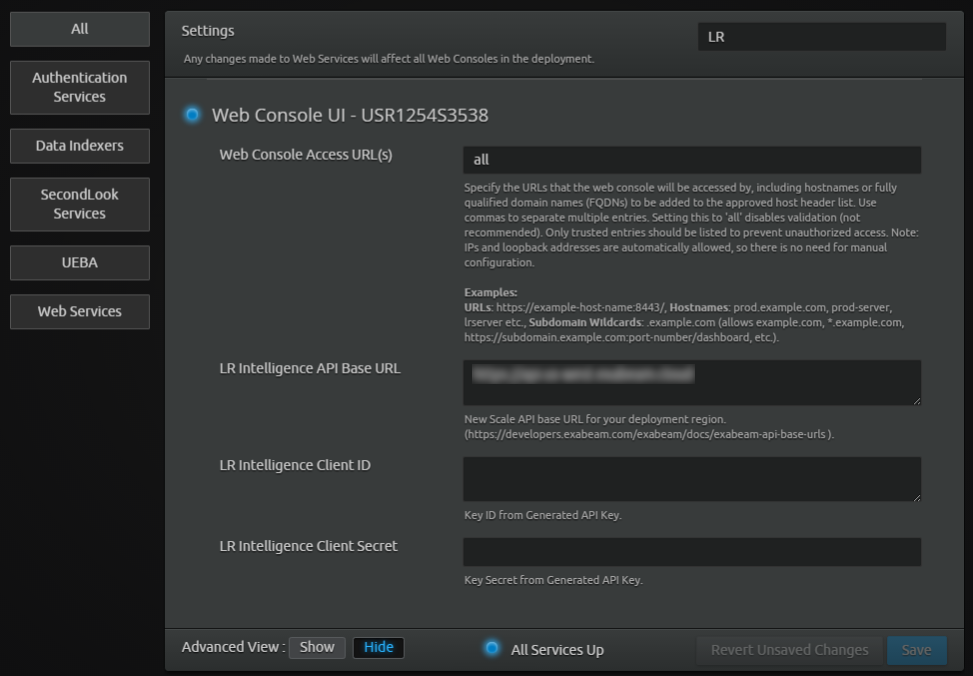
Select the All tab on the left.
-
Locate the LR Intelligence fields and enter the following information:
|
Field |
Description |
|---|---|
|
LR Intelligence API Base URL |
Enter the New-Scale API base URL to which the API connection is made. To find your API base URL, refer to the Exabeam API Gateways topic. |
|
LR Intelligence Client ID |
Enter the Key ID that was generated in the previous section. |
|
LR Intelligence Client Secret |
Enter the Key Secret that was generated in the previous section. |
|
LR Intelligence Proxy URL (Optional.) |
Enter the proxy server URL you wish to use to upload data to LogRhythm Intelligence. When the proxy server is configured, all outbound requests are routed through the specified proxy. |
|
LR Intelligence Proxy CA Certificate (Optional.) |
If using a proxy which signs its traffic with an untrusted certificate, copy the public CA certificate in PEM format. Alternatively, click Choose file… to navigate to a certificate file and upload it. This field is only required if a proxy server URL has been entered above. |
-
Select the Web Services tab on the left-hand side of the Configuration Manager.
-
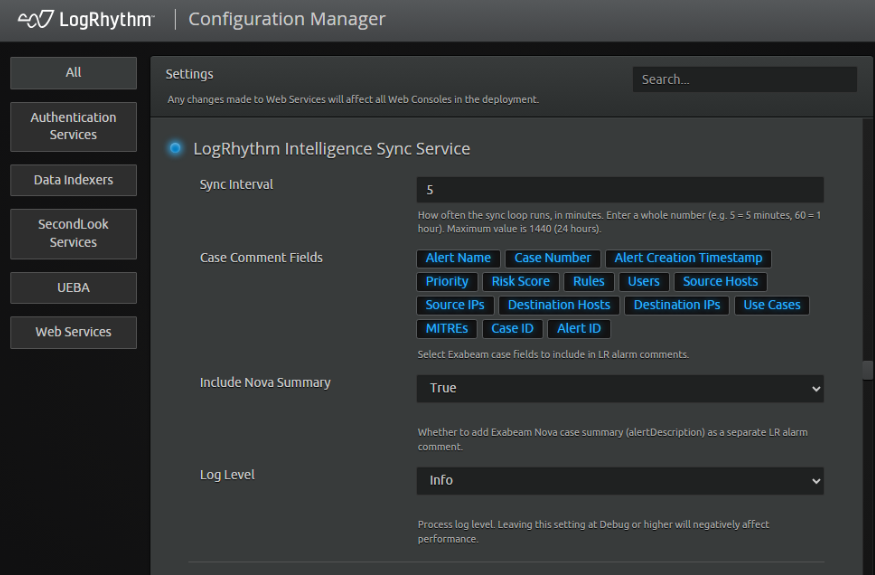
Locate the LogRhythm Intelligence Sync Service fields and enter the following information:
|
Field |
Description |
|---|---|
|
Sync Interval |
Enter a value, in minutes, to determine how frequently the Sync Service operates. By default, this value is 10 minutes. It can range anywhere from 5 minutes to 1440 minutes (24 hours). |
|
Case Comment Fields |
Click any of the provided fields to determine which Exabeam Case fields are included in the LogRhythm Alarm comments. |
|
Include Nova Summary |
Select True or False to determine whether the Exabeam Nova Case Summary (alertDescription field) is included as a separate LogRhythm Alarm comment. |
|
Log Level |
Select a level to determine the amount of information logged to the lr-intelligence-sync.log file:
|
-
Click Save.
The API connection settings are successfully saved.
Use the LogRhythm Intelligence Sync Service
Once the LogRhythm Intelligence Sync Service is configured and your New-Scale API credentials have been updated in the Configuration Manager, the LogRhythm Web Console is automatically able to sync with New-Scale and update LogRhythm Alarms with information from Exabeam Cases using the Vendor Message ID field to match the two.
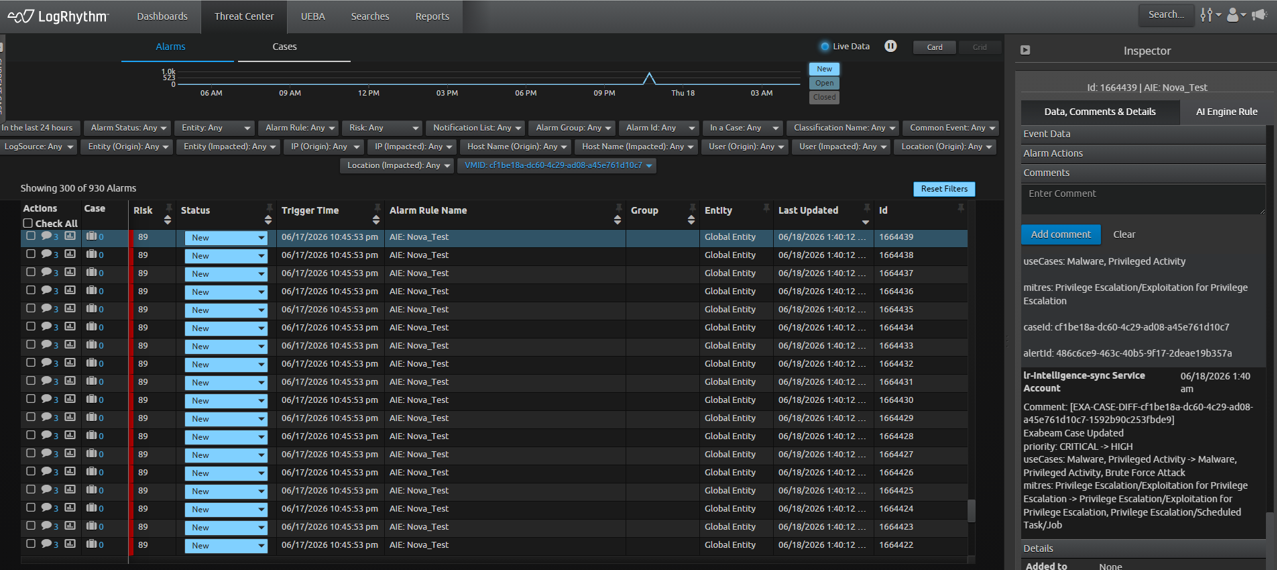
When the link is initially made, a “Case Snapshot” is added to the LogRhythm Alarm to indicate that the sync has been made. Each time an analyst updates any of the following information on a Case in New-Scale, those changes are reflected in the LogRhythm Web Console whenever the Sync Service runs (configured using the Sync Interval field in the Web Console Options):
-
Risk score
-
Status
-
Assignee
-
Notes
The complete New-Scale Case history can be viewed directly from the LogRhythm Alarm in the Web Console. Any updates to the New-Scale Case’s Risk score also update the LogRhythm Alarm’s Risk-Based Priority (RBP).
At this time, changes made to LogRhythm Alarms do not yet sync to New-Scale Cases.
How Correlation Works
The Sync Service uses the Vendor Message ID (VMID) field as an exact correlation key to link LogRhythm alarms with New-Scale cases. The correlation workflow operates as follows:
-
Exabeam Case Beat Ingestion. The Exabeam Case Beat pulls cases from New-Scale and creates log events in LogRhythm. The New-Scale case ID is parsed and mapped into the VMID field of these log events.
-
AIE Rule Triggers. The "LRI Case Created in New Scale" AIE rule (or custom rules) detects these logs and creates an alarm. The rule groups the alarm by VMID, ensuring the New-Scale case ID is preserved in the alarm's VMID field.
-
Sync Service Correlation. At each sync interval (configured in the Web Console Options), the Sync Service:
-
Queries LogRhythm alarms that contain a populated VMID field;
-
Matches the VMID value against New-Scale case IDs; and
-
Enriches matching alarms with real-time case updates from New-Scale.
-
-
Enrichment Updates. When a match is found, the Sync Service adds or updates alarm comments with New-Scale case information, including risk score changes, status updates, assignee changes, and analyst notes.
Initial Sync - Case Snapshot
When the Sync Service first correlates a LogRhythm alarm with a New-Scale case, it adds a "Case Snapshot" comment to the alarm. This snapshot includes the selected Case Comment Fields configured in the Web Console Options (such as case status, risk score, assignee, and other relevant metadata).
The snapshot confirms that the bi-directional link between the alarm and New-Scale case has been established.
Ongoing Sync - Delta Updates
After the initial snapshot, the Sync Service continues to monitor the New-Scale case for changes. Each time the service runs (based on the configured Sync Interval), it checks for updates to the following case fields:
|
Field |
Description |
|---|---|
|
Risk Score |
Updates the LogRhythm alarm's Risk-Based Priority (RBP) to match the New-Scale case risk score. |
|
Status |
Adds a comment reflecting the case status change (e.g., "New" to "In Progress"). |
|
Assignee |
Adds a comment when the case is assigned to a different analyst. |
|
Notes |
Syncs analyst notes added in New-Scale as alarm comments in LogRhythm. |
These delta updates appear as new comments on the LogRhythm alarm, providing a complete audit trail of case activity directly within the SIEM.
View New-Scale Case History
The complete New-Scale case history can be viewed directly from the LogRhythm alarm in the Web Console. All comments added by the Sync Service are timestamped and attributed to the service, making it easy to distinguish automated updates from manual analyst comments.
Risk-Based Priority (RBP) Synchronization
Any updates to the New-Scale case's Risk Score automatically update the LogRhythm alarm's Risk-Based Priority (RBP). This ensures that alarm prioritization in LogRhythm reflects the latest threat intelligence and risk assessment from New-Scale.