
Welcome to the release of LogRhythm SIEM version 7.24! This update introduces several new features and enhancements designed to improve your analytical capabilities and streamline security workflows. We've focused on enhancing data visibility and analytics within the Data Indexer (DX) Dashboards, which are now more powerful with the addition of a new mode for Metric Widgets. Additionally, investigations are more intuitive thanks to real-time enrichment for AI Engine (AIE) events, which turns numeric, internal IDs into human-readable, searchable names before indexing. This release also brings enhancements to our collection capabilities, including the debut of our new Tenable Beat for even more flexible data collection. Finally, backend updates, including the migration of our SecondLook API to .NET 8, provide a higher-performing, more stable experience. We're excited for you to explore these new capabilities in LogRhythm version 7.24!
What’s new in LogRhythm SIEM 7.24:
Maintenance
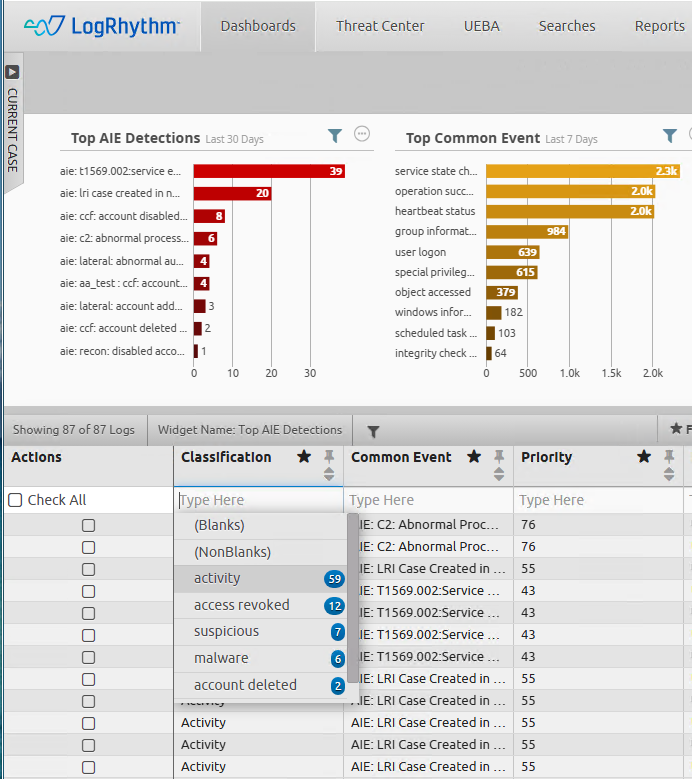
AI Engine Event Enrichment During Indexing
The LogRhythm SIEM 7.24 release introduces real-time enrichment for AI Engine (AIE) events within the Data Indexer (DX). Previously, AIE event payloads contained only numeric identifiers that made them difficult to find via searches. With this enhancement, these identifiers are now resolved to their human-readable string values (e.g., classificationName, hostName) before the event is written to the index. As a result, these enriched fields are fully indexed and searchable, allowing analysts to perform Lucene filtering and build accurate dashboard aggregations directly on meaningful entity names. This streamlines investigative workflows and improves the usability of AIE event analysis within DX dashboards. To support this, a new “AI Engine” option will display in the Log Source column within the Megagrid.
Secondlook API Improvements - Now 9x Faster!
As part of our ongoing efforts to improve performance and maintain a modern architecture, the SecondLook API service within the Web Console has been migrated to .NET 8. This backend update leverages the significant performance benefits and new functionality offered by the new framework. Included with this migration are updates to the archive restoration process which enable parallel processing of archive files, when enabled this feature offers further performance benefits (up to 150,000 mps restoration processing, which is up to nine times faster than previous). While this migration provides improved performance and a more modern framework, all existing API functionality and endpoints remain unchanged.
More information on the SecondLook feature can be found in the SecondLook and SecondLook API - Web Console topics.
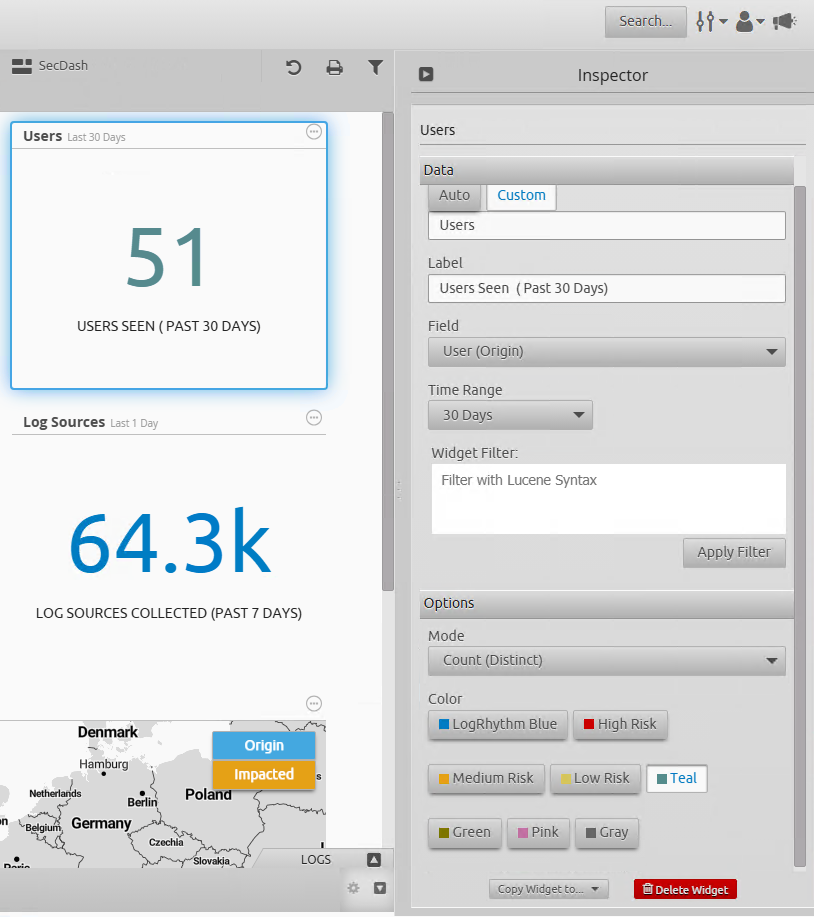
New Metric Widget Function: “Count Distinct”
With this LogRhythm release, the Metric Widget in DX Dashboards has been updated with a new Count (Distinct) mode. This feature enables you to calculate the number of unique values for a selected field directly within a dashboard widget. Previously, the widget only supported a total “Count” of all non-blank values. Now, you can easily determine the number of distinct entities, such as unique user accounts, source IPs, or hostnames, involved in an event set, providing deeper analytical context without leaving your dashboard. The Count (Distinct) option is available in the Mode dropdown in the widget’s configuration settings.
For more information on this new widget function, refer to Configure Metric Widget Settings.
Open Collector Updates and New Tenable Beat
A new Tenable Beat has been added to the Open Collector, allowing users to leverage Tenable Vulnerability Management to collect logs using the Open Collector infrastructure.
For more information, refer to the Tenable Beat documentation.
Additionally, a new option has been added to the Microsoft Graph API Beat which allow GCC High customers to specify their status during beat configuration, allowing log collection within these environments.
For more information, refer to Initialize the Microsoft Graph API Beat and Add a New Beat in Web Console.
Secure JSON Listener
The LogRhythm JSON Listener can now accept logs securely from third-party shippers like Cribl and Databahn using SSL encryption. This feature is enabled through new System Monitor Advanced Properties, where you can specify the path to your SSL certificate and private key on both Windows and Linux System Monitors. To streamline troubleshooting, detailed connection and SSL-related errors are now recorded in the scsm.log file, ensuring a smooth and secure integration for your cloud log sources.
For more information on the Secure JSON Listener, refer to JSON Normalization Customization and Generic JSON Collector.
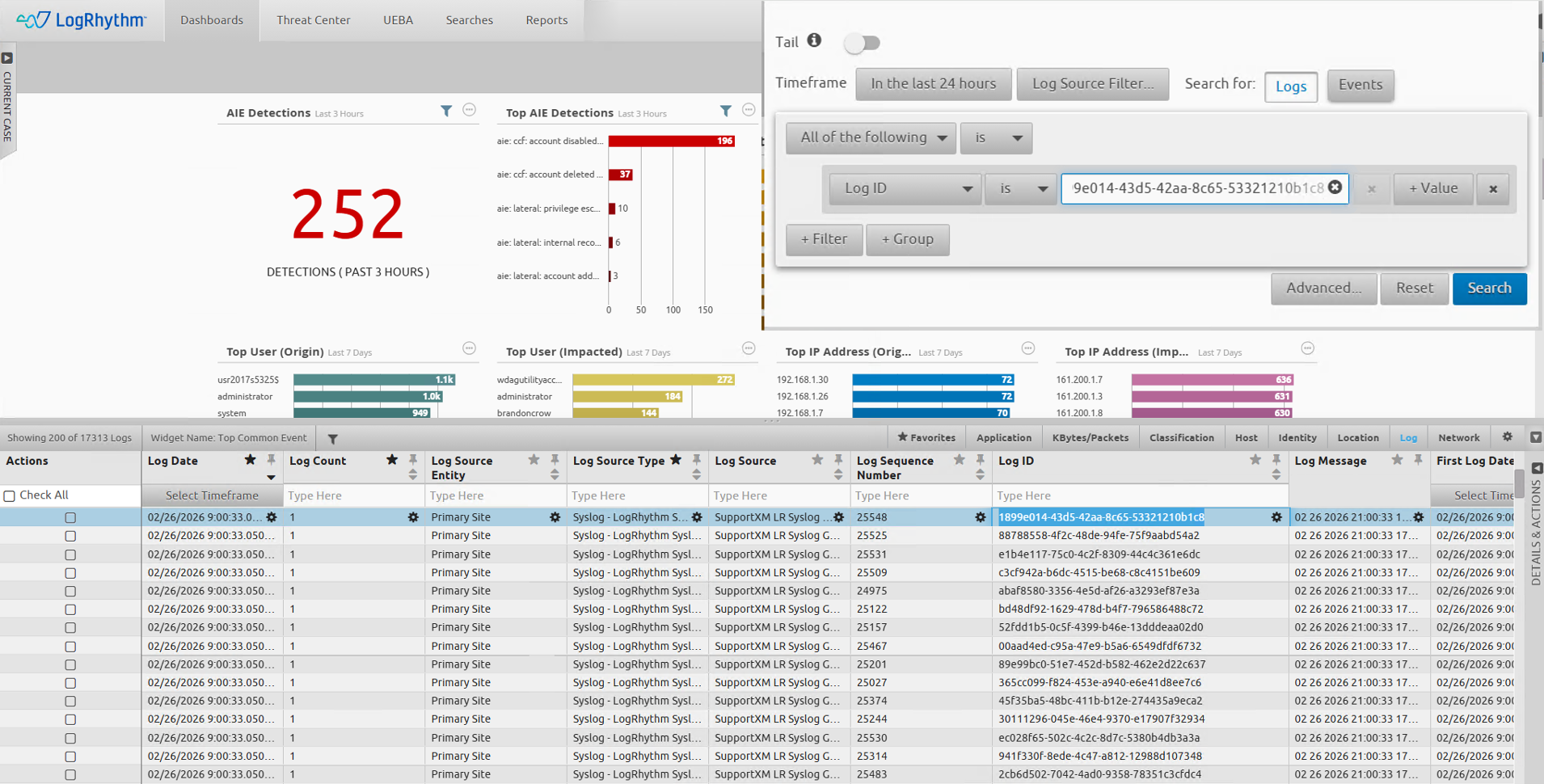
LogID Visibility
The LogID, introduced as part of LogRhythm SIEM version 7.20 as a unique identifier for incoming logs, has been added as an available column in the log grid on Data Indexer (DX) Dashboards, allowing users to view and copy the unique identifier for any log. Additionally, the search functionality has been enhanced to allow direct querying against the LogID field when searching the DX. For the first time, these unique IDs can be used by customers to instantly retrieve an exact log message by its unique identifier.
For more information on Data Indexer Dashboards, refer to the DX Dashboards topic.
Log Source Enhancements and Updates
LogRhythm SIEM 7.24 introduces updates designed to enhance the speed, consistency, and compatibility of data collection with third-party platforms. These enhancements include:
-
New log sources based on customer requests and feedback.
-
Improvements around Forcepoint log source collection.
New and Updated Log Sources
This past quarter of bi-weekly LogRhythm SIEM Knowledge Base updates included more than 41 enhanced or improved log sources, and four newly introduced log sources. This allows customers to expand their security capabilities by increasing log visibility within the LogRhythm SIEM.
The following log sources have been added or updated:
|
New Log Sources |
Updated or Improved Log Sources |
||
|---|---|---|---|
|
|
|
|
Platform Updates
LogRhythm 7.24 is packed with platform updates to improve security, performance, and stability. Spend more time hunting for threats and less time managing the platform.
Security Improvements
The following enhancements were made to improve the overall security standing of the SIEM product:
-
Private Key Storage for Web Console and Common services has been tightened
-
TLS Support for JSON listener on Windows System Monitor Agent
Dependency Updates
As part of our ongoing commitment to maintaining third-party dependencies for stability and security improvements, the following packages have been updated:
-
Data-Indexer Java Corretto JRE updated to version 8.0.482,
-
Web-Indexer Java Corretto JDK updated to version 21.0.10,
-
Elasticsearch Temurin JDK updated to version 17.0.18+8,
-
.NET 8 Core updated to version 8.0.25,
-
Grafana updated to version 12.4.0,
-
Electron has been updated to version 39.6.1 for Configuration Manager, Diagnostics Agent and LogRhythm Diagnostics
Smart Response Plugin (SRP) Updates
The following Smart Response Plugins have received updates alongside the release of LogRhythm SIEM version 7.24:
-
Case Management SRP
-
Microsoft Defender 365 SRP
-
LoadUserProfile SRP
-
AWS SRP
-
Okta SRP
-
Palo Alto Networks Firewall SRP
For LogRhythm SRP guides and downloads, refer to the LogRhythm Community.
LogRhythm Echo Version 2.0.10
LogRhythm Echo was updated to version 2.0.10 with this release of the LogRhythm SIEM.
In order to upgrade to version 2.0.10 of LogRhythm Echo, you must first uninstall LogRhythm Echo completely and then install the new version. If you have created custom use cases, be sure to backup the usecases.db file in the Echo directory and restore it after the installation.
For more information on LogRhythm Echo, refer to the LogRhythm Echo documentation.
Deprecation Notices
-
Linux System Monitor Agents have been moved to .NET 8 in LogRhythm SIEM version 7.23.0. LogRhythm SIEM version 7.24.0 is the last version for which maintenance activities will take place against the older builds (versions ending in 1xxx like 7.19.0.1000). Customers should migrate to updated .NET 8 System Monitor Agents for the best, most up-to-date features and defect fixes. The older agents will continue to function; however, maintenance for those agents will cease starting with this release. Any customers reporting defects with older System Monitor Agents will be asked to migrate to the .NET 8 agent builds (ending in 2xxx like 7.24.0.2000).
-
Data Indexer support for CentOS and RHEL 7 ended with LogRhythm SIEM version 7.22. Refer to the Notice of Deprecation section in the LogRhythm SIEM version 7.22.0 release notes for additional details.
Resolved Issues & Improvements
The following issues have been resolved either via a defect fix or a platform improvement in LogRhythm SIEM 7.24.
|
Bug # |
Component |
Description |
|---|---|---|
|
ENG-33439 |
Web Console |
The Lucene “NOT” filter is now functioning as expected for searches involving IP addresses. |
|
ENG-43058 |
Notification Service |
The notification service will no longer hang when it fails to connect to a configured SMTP server. |
|
ENG-43206,
|
Smart Response Plugins (SRPs) |
An issue that was causing the Microsoft 365 Defender SRP endpoints to not function correctly has been resolved. |
|
ENG-52226 |
Disaster Recovery Environments, High Availability + Disaster Recovery Environments |
An issue that was causing alarms to duplicate in certain situations during patches or reboots has been resolved. |
|
ENG-53812 |
AI Engine |
An issue with the Data Processor writing unnecessary AIE Data Provider stats to the database, causing high wait/load times, has been resolved. |
|
ENG-54514 |
Disaster Recovery Environments, High Availability + Disaster Recovery Environments |
An issue with Service Registry Key Value imports timing out because the Service Registry did not fully initialize after a restart has been resolved by adding more time for the import to take place. |
|
ENG-58530 |
Smart Response Plugins (SRPs) |
The plugin no longer throws a “response status code does not indicate success” error message in certain situations when attempting to use the “Add IP to Group” action. |
|
ENG-58767 |
Smart Response Plugins (SRPs) |
The Okta SRP’s user-related actions no longer require case sensitivity in order to function properly. |
|
ENG-59125 |
Web Console |
Updating the name of an AIE Alarm Rule now correctly shows the updated rule name in the Client and Web Consoles immediately when triggered, instead of taking some time to update internally. |
|
ENG-60480 |
Data Indexer |
Incorrectly configured passwords for the NGLM account will no longer cause port leakage through the Carpenter service. |
|
ENG-61042 |
High Availability Environments |
An issue that was causing the HA install script to fail in certain situations has been resolved by normalizing case handling, meaning the script no longer requires case sensitivity to run properly. |
|
ENG-61153 |
Smart Response Plugins (SRPs) |
An issue that was causing the “Block IP” action to throw error messages and not function properly in certain situations has been resolved. |
|
ENG-62630 |
SecondLook API |
An issue with MPE timeouts occurring when using the SecondLook API has been resolved by moving SecondLook to the .NET 8 Framework. Refer to the SecondLook Performance Enhancements section above for more information. |
|
ENG-62745 |
Job Manager |
An issue with email notifications for reports not including report attachments and giving a misleading “Exceeded Storage Allocation” error message in situations where it does not apply has been resolved. |
|
ENG-63276 |
Disaster Recovery Environments |
An issue where Disaster Recovery monitoring could incorrectly assign cluster resources to multiple nodes during failover, resulting in repeated GroupCheck errors, has been resolved. |
|
ENG-63729 |
System Monitor Agents |
An issue in which parsed syslog host identifiers could be matched with an incorrect log source due to incorrect pattern recognition has been resolved. |
|
ENG-63847 |
System Monitor Agents |
The Realtime File Integrity Monitoring (FIM) system now works as expected with System Monitor Agents versions 7.16 and above. |
|
ENG-63879 |
Web Console |
An issue in which accepting a syslog source through the Web Console UI caused the Hostname to be incorrectly entered as an IP address type, causing searches to fail in certain situations, has been resolved. |
|
ENG-71210 |
Client Console |
Importing virtual log sources using a .csv file no longer results in those log sources being listed as “invalid” in certain situations. |
|
ENG-73015 |
Web Console |
All groups are now correctly visible when attempting to add users/groups to a Case in the Web Console. |
|
ENG-74364 |
AI Engine |
An issue with Threat IDs grouping incorrectly in “Threshold Observed” and “Log Observed” rule blocks has been resolved. |
|
ENG-76908 |
Web Console |
Exporting filtered logs from the Analyze tab now correctly abides by the filter criteria. |
|
ENG-78166 |
System Monitor Agents |
An issue with intermittent System Monitor Agent crashing after upgrades to versions 7.21+ has been resolved. |
|
ENG-78451 |
Disaster Recovery Environments |
An issue where DR Monitor could incorrectly initiate a forced failover in certain situations, even after the user explicitly selected "No" and "Exit," has been resolved. |
|
ENG-78964 |
System Monitor Agents |
Upgrading from the version 7.21 .NET 8 System Monitor Agent to the version 7.22 .NET 4 System Monitor Agent no longer causes the agent to cease working in certain situations. |
|
ENG-79365 |
SecondLook API |
Using the SecondLook API to restore inactive archives no longer fails at the “Completing Restoration” step without actually restoring logs. |
|
ENG-81015 |
Client Console |
Removed the ability to add a “line break” to a log source name in the Client Console, which could result in System Monitor Agents failing to start. |
|
ENG-81169 |
High Availability + Disaster Recovery Environments |
An issue that would cause the API Gateway to stop in certain situations during HA failover has been resolved. |
|
ENG-82240 |
Smart Response Plugins (SRPs) |
The Case Management SRP now correctly associates incoming alarms with the same ID as an existing case with that case instead of creating a new one. |
|
ENG-83597 |
System Monitor Agents |
Newly created AWS CloudWatch log sources now correctly abide by the NumOfBackDaysData setting in the log source’s configuration file. |
|
ENG-84140 |
Log Processing Policy |
The Open Collector - Mimecast SIEM processing policy has been updated to correctly parse the timestamp using the local time zone rather than UTC. |
|
ENG-84189 |
Web Console |
Web Console Data Indexer Dashboards no longer fail to load data in certain situations when logged into the Web Console with a Windows account. |
|
ENG-84191 |
Web Console |
Lucene searches were failing due to issues with fields not being supported on Event vs. DX Dashboards. The Supported Lucene Fields by Dashboard Type page has been added to the documentation to clarify which fields are supported for Lucene searches on which dashboard type. |
|
ENG-84458 |
LogMart |
An issue where LogMart Batch Insert jobs were showing as completed successfully even when they failed has been resolved. |
|
ENG-84707 |
Web Console |
Attempting to sort a list of cases by Case Number (descending) now works as expected. |
|
ENG-84888 |
Reporting |
Disabled user accounts are no longer included in the list of potential recipients for a scheduled report. |
|
ENG-84953 |
Database |
Performance Improvements made to the Events Database maintenance to speed execution times |
|
ENG-85009 |
Web Console |
Filtering now works as expected for the “Top IP Address V6 (Origin)” and “Top IP Address V6 (Impacted)” fields in both Lucene and MegaGrid column filters. |
|
ENG-85088 |
System Monitor Agents |
An issue in which System Monitor Agents could load incorrect certificates for secure syslog servers if more than one certificate had the same subject name has been resolved. |
|
ENG-85091 |
Log Sources |
Accepting a log source with any combination of the DNS, Windows name, and IP address configured no longer results in an “unable to accept new log sources” error message in certain situations. |
|
ENG-85092 |
AI Engine |
Changing the alarm status on AIE Rules no longer results in duplicate key errors in certain situations within multi-AIE environments. |
|
ENG-85099,
|
Log Processing Policy |
The Open Collector - MSGraph API processing policy has been updated to correctly map the “verdict,” “id,” “incidentId,” “severity,” “title,” “grouporder,” “group,” and “reason” fields. |
|
ENG-85253 |
Threat Intelligence Service (TIS) |
CrowdStrike server file downloads through the TIS no longer result in duplicate entries within the Job Manager log file in certain situations. |
|
ENG-85531 |
Data Indexer |
Performance improvements have been made to GoMaintain on Warm Node indexes to prevent excessive memory and disk space consumption in certain situations. |
|
ENG-85868 |
Data Indexer |
Improvements have been made to Columbo to address issues with indexes remaining open following a search cycle and to better handle searches that require pagination. |
|
ENG-85886 |
Log Processing Policy |
The Open Collector - Azure Event Hub processing policy has been updated to correctly parse the “severity” field. |
|
ENG-86094 |
AI Engine |
Rules with the “Unique Value” rule block no longer incorrectly fire in situations when the unique criteria is not satisfied. |
|
ENG-86345 |
Disaster Recovery Environments |
An issue where the DR Login Propagation Job Validation step would remain in a permanent failure state in certain situations after a temporary error has been resolved. |
|
ENG-86472 |
AI Engine |
Rules with special characters (specifically, backslashes, quotation marks, and semicolons) in their titles no longer prevent the AI Engine from starting up in certain situations. |
|
ENG-86623 |
Web Console |
The Entity (Origin) and Entity (Impacted) fields now correctly only show for Data Indexer (DX) Dashboard Lucene queries. |
|
ENG-86658 |
Log Processing Policy |
The Open Collector - Cisco Umbrella processing policy has been updated to correctly parse the “filter” field. |
|
ENG-86833 |
AI Engine |
An issue with logs arriving with a UTC timestamp several hours in the “future” preventing alarms from being generated due to the processing window being pushed into the future has been resolved. |
|
ENG-88049 |
Log Processing Policy |
The Azure Event Hub and O365 processing policies have been updated to prevent incorrect “duplicate schema” warnings from generating in the log files. |
|
ENG-88074 |
Log Sources |
Log source error messages generated in the log file now correctly provide the Log Source IDs to assist in troubleshooting. |
|
ENG-88179 |
Smart Response Plugins (SRPs) |
The Microsoft Load User Profile Smart Response Plugin has been updated to prevent incorrect “HashMismatch” error messages. |
|
ENG-88323 |
Disaster Recovery Environments |
Improved DR login propagation visibility by introducing a troubleshooting mechanism, delivered as a stored procedure in the master database, to verify login synchronization between Primary and DR sites. |
|
ENG-88628 |
System Monitor Agents |
Upgrading from System Monitor Agent version 7.22 (.NET 8) to version 7.23 (.NET 8) no longer results in unexpected crashes and error messages in certain situations. |
|
ENG-88816 |
High Availability + Disaster Recovery Environments |
An issue where the DR Service Control script could fail on a passive DR node in certain situations by attempting to start a SQL Agent job has been resolved. |
|
ENG-88912 |
Web Console |
The Web Console Threat Center now correctly persists the user’s last selected tab (Alarms or Cases) rather than always defaulting to the Alarms tab. |
|
ENG-89363 |
ElasticSearch |
ElasticSearch has been updated such that it no longer produces a corrupted elasticsearch.pid file and fails to start in certain situations. |
|
ENG-89386 |
Message Processing Engine (MPE) |
The lps_detail.log file has been updated to include more useful information, such as the percentage of MPE timeouts and the individual timeout details. |
|
ENG-90063 |
Data Indexer |
The Data Indexer Linux Imaging .iso file has been updated to include relevant files for the Rocky Linux 9.7 update. |
|
ENG-92296 |
SecondLook |
SecondLook jobs no longer continue to process archive files even after reaching the specified maximum logs to recover limit. |
|
ENG-92573 |
Web Console |
An “unsaved changes” warning message no longer incorrectly appears in certain situations when navigating away from a Case in the Web Console. All changes on cases continue to be saved automatically. |
Resolved Issues - Security
Security-related issues resolved with this release are available for customers to view in the Community.
Known Issues
The following issues have each been found and reported by multiple users.
|
Bug # |
Found In Version |
Components |
Description |
Notes |
|---|---|---|---|---|
|
ENG-75096 |
7.21 |
Web Indexer |
Following an upgrade from versions prior to 7.20 to 7.21 or higher, some customers are experiencing blank widgets in the Web Console. During the upgrade to 7.21, web indices were migrated to a new Lucene version. Some customers with very large web indices or systems with limited memory may be experiencing “out of memory” (OOM) conditions with the Web Indexer migration tool, or the Web Indexer migration tool window closes before migration finishes. |
Expected Results: Web Indices should be migrated smoothly as part of the upgrade. Workaround Options:
|
|
ENG-78023
|
Multiple |
Web Console UI |
Environments with multiple web consoles may experience out of sync alarm information displayed in the web console until a status update is made to an alarm. This issue most often occurs following an HA/DR failover event or when Web Indexer is under heavy load due to excessive alarm drilldown requests |
Expected Results: Alarm information should be consistent across all Web Console Instances Workaround: Changing alarm status will trigger a refresh of the alarm details for all web console instances in the deployment |
|
ENG-61278 |
7.19 |
APIs |
After upgrading to LogRhythm SIEM version 7.19, servers running Windows Server 2012 R2 may throw errors when attempting to use the LogRhythm API or connecting through API Gateway. |
Expected Results: The LogRhythm API should function as expected. Workaround: A workaround for this issue has been documented at LogRhythm API Gateway Error on Windows Server 2012 R2. |