
Welcome to LogRhythm SIEM 7.23, a release focused on making your security operations faster and more efficient, from initial threat investigation to large-scale administration. We are closing critical gaps in the analyst workflow by bringing high-fidelity AIE detections and global Threat Map visualizations directly to your modern Data Indexer (DX) dashboards. This creates a single, unified view that empowers your team to correlate threats and accelerate investigations without switching between screens. For administrators, this release introduces a foundational AIE Administration API, enabling you to programmatically manage rules and begin treating your detections as code. From a more cohesive analyst experience to powerful new automation capabilities, and much more, LogRhythm SIEM 7.23 is a critical step forward in empowering your team to defend smarter and faster.
What’s new in LogRhythm SIEM 7.23:
Maintenance
AIE Detections Direct to Your Dashboard
To investigate threats efficiently, analysts need a complete and unified view of all relevant data. However, a critical source for threat hunting was missing from your most powerful analytics tool: detections from the Advanced Intelligence Engine (AIE). This forced your team to switch between modern Data Indexer (DX) dashboards and legacy views, creating an incomplete picture that slows down investigations.
With LogRhythm SIEM 7.23, that workflow gap is closed. AIE events can now stream directly to the Data Indexer, making them a native data source for all your DX dashboard widgets. This means you can now build powerful, context-rich widgets that place high-fidelity AIE detections alongside the raw log data you need for investigation. The result is a faster, more streamlined workflow, empowering your team to correlate threats and respond without ever leaving their primary dashboard.
For more information on configuring AIE detections on your DX Dashboard, refer to Configure the Advanced Intelligence Engine.
Threat Map Visualization Comes to DX Dashboards
Along with unifying your threat and log data, we are bringing another essential visualization to your primary workspace. The Threat Map, a powerful tool for visualizing global activity, was previously confined to legacy dashboards, preventing you from correlating geographic patterns within your main analytical view.
Now, this essential widget comes to your DX Dashboards, allowing you to place it alongside AIE events and log data for a more complete intelligence picture. The visualization itself has also been refreshed with improved granularity and clarity. To ensure a consistent, high-quality experience, this visual upgrade applies to the Threat Map on legacy dashboards as well, delivering a better viewing experience platform-wide.
For more information, refer to Threat Activity Map.
AIE Administration API
For large enterprises and MSSPs, manually managing Advanced Intelligence Engine (AIE) rules across multiple deployments is a significant operational bottleneck. This manual process slows down the deployment of critical threat detections and makes it difficult to maintain consistency across all your environments.
LogRhythm SIEM 7.23 introduces a powerful new administration API for AIE, providing the foundational step toward automating your detection-as-code pipeline. Once you have perfected a rule in your test environment, you can now use the API to programmatically deploy it across your entire infrastructure. The new endpoints allow you to import existing rules, enable or disable them, and restart the AIE service to ensure they take effect immediately.
This API-first approach allows your team to streamline operations and dramatically reduce manual effort. Instead of clicking through UI menus in each deployment, you can now script the rollout of a critical new detection to all your customer tenants or production systems in a fraction of the time. It’s the first step in treating your AIE rules like code, enabling greater speed, consistency, and efficiency for your security operations.
For more information, refer to the LogRhythm API Developer Portal.
Open Collector Updates & New Collector
Our legacy method for collecting Salesforce data presented significant operational challenges. Configuration required manual editing of local .ini files, but more importantly, the collection logic was hardcoded into the System Monitor Agent itself. This meant that new features or critical fixes to the collection was tied to the full agent release cycle, delaying your access to essential capabilities.
As part of our ongoing strategy to modernize log collection, we are excited to introduce the new Salesforce Audit Beat for our Open Collector architecture. This new model decouples the collection logic from the agent, allowing the beat to be updated independently. This not only streamlines configuration by moving it into the Web Console but also fundamentally improves the update process.
For more information, refer to Salesforce Audit Beat.
Effortless JSON Policy Creation
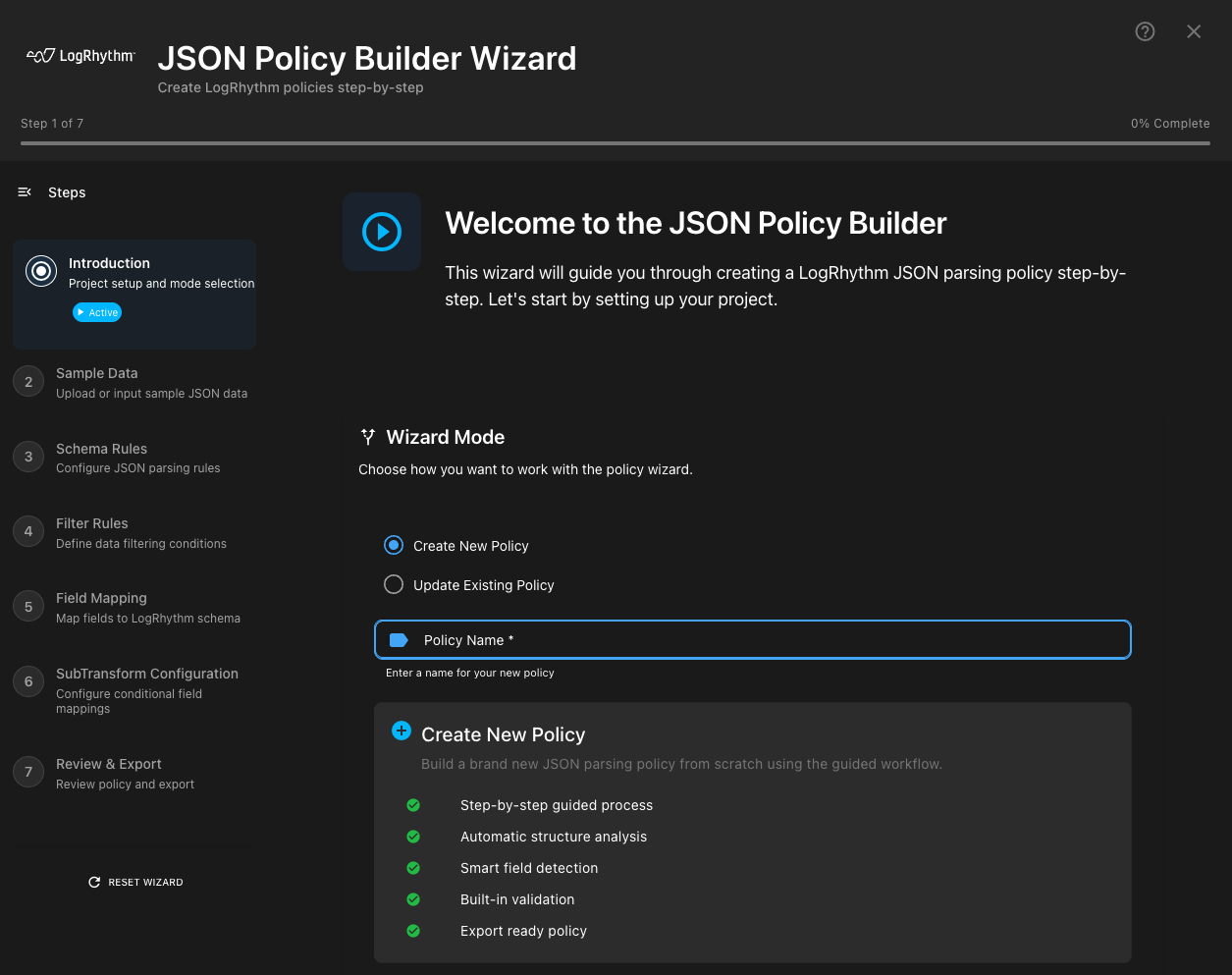
The days of rebuilding entire JSON policies just to make a minor tweak or fumbling with nested JSON objects are over. Speed up the process of onboarding critical log sources with the redesigned JSON Policy Builder. You can now import an existing policy, modify it, and save your changes in minutes. And with full support for nested JSON, you can accurately parse even the most complex data structures.
For more information, refer to the updated JSON Policy Builder documentation.
Modernized Platform Support and Linux .NET 8 Agents
Maintaining a secure and performant SIEM requires staying current with the latest operating systems and collection technologies. Your security posture and operational efficiency depend on it.
This release adds full support for Windows Server 2025 and Rocky 10, ensuring you can deploy LogRhythm in the most modern and secure environments. We're also introducing a new Linux System Monitor Agent, now including the powerful JSON listener previously exclusive to Windows. This means you can securely and efficiently collect rich JSON logs from your Linux systems without additional agent deployments.
For more information on the new Linux Agent, refer to Install a .NET 8 System Monitor on Linux/UNIX.
Log Source Enhancements and Updates
LogRhythm SIEM 7.23 introduces updates designed to enhance the speed, consistency, and compatibility of data collection with third-party platforms. These enhancements include:
-
New log sources based on customer requests and feedback.
-
Improvements around Forcepoint log source collection.
New and Updated Log Sources
This past quarter of bi-weekly LogRhythm SIEM Knowledge Base updates included more than 50 enhanced or improved log sources, and six newly introduced log sources. This allows customers to expand their security capabilities by increasing log visibility within the LogRhythm SIEM.
The following log sources have been added or updated:
|
New Log Sources |
Updated or Improved Log Sources |
||
|---|---|---|---|
|
Syslog - Fortinet FortiWeb CEF Syslog - Akamai Guardicore Centra CEF Syslog - Trend Micro Deep Discovery Analyzer CEF Syslog - Open Collector - Salesforce Audit SetupAuditTrail Syslog - Open Collector - Salesforce Audit LoginHistory Syslog - Open Collector - Salesforce Audit EventLog |
Syslog - F5 BIG-IP ASM Key-Value Pairs Syslog - Open Collector - Azure Event Hub Syslog - BIND DNS Syslog - Open Collector - AWS CloudTrail Syslog - Cisco Firepower Threat Defense Syslog - Cisco Firepower Threat Defense Syslog - Open Collector - Sophos Central Flat File - LogRhythm System Monitor Log File Syslog - McAfee ePO Syslog - Medigate CEF MS Windows Event Logging XML - PowerShell Syslog - Fortinet Fortigate Syslog - Cisco ASA Syslog - Citrix Netscaler Syslog - F5 BIG-IP LTM Syslog - Cisco Switch |
Syslog - Forcepoint Stonesoft NGFW Syslog - Crowdstrike FalconHost CEF Syslog - F5 BIG-IP ASM v12 MS Windows Event Logging XML - System Syslog - VMWare ESX/ESXi Server Syslog - F5 BIG-IP ASM Syslog - Blue Coat ProxySG Flat File - Linux Audit Log Syslog File - Linux Host Syslog - Dell Remote Access Controller Flat File - Microsoft IIS SMTP W3C Format Syslog - Cisco Web Security Flat File - Oracle WebLogic 11g Access Log Syslog - Aruba Clear Pass Syslog - Tenable SecurityCenter Flat File - LogRhythm Data Indexer Monitor Syslog - Sophos XG Firewall |
Syslog - Generic Linux OS Syslog - F5 BIG-IP ASM CEF Syslog - Trend Micro Vision One CEF Syslog - Open Collector - Mimecast SIEM Syslog - Open Collector - Network Monitor Evt Logs Syslog - VMWare vCenter Server Syslog - Open Collector - SentinelOne Syslog - Fortinet FortiAuthenticator MS Windows Event Logging XML - System MS Windows Event Logging - TS Remote Connection Manager Syslog - Fortinet Fortiweb Syslog - Zscaler Nano Streaming Service Syslog - Palo Alto Cortex Data Lake CEF Syslog - ManageEngine PAM360 Syslog - ESET Remote Administrator (ERA) LEEF MS Windows Event Logging XML - Security MS Windows Event Logging XML - Application |
Platform Updates
LogRhythm 7.23 is packed with platform updates to improve security, performance, and stability. Spend more time hunting for threats and less time managing the platform.
Dependency Updates
As part of our ongoing commitment to maintaining third-party dependencies for stability and security improvements, the following packages have been updated:
-
Data-Indexer Java Corretto JRE updated to version 8.0.472,
-
Web-Indexer Java Corretto JDK updated to version 21.0.9,
-
.NET 8 Core updated to version 8.0.22,
-
Grafana updated to version 12.3.0,
-
Go Update to version 1.24.2 for Case API, and
-
NodeJS Updates to API Gateway (Linux) and Web Console API.
An API Gateway NodeJS update is now included with the Linux build of API Gateway. Note that NodeJS (a requirement of API Gateway) no longer supports CentOS 7, therefore ending support for CentOS/RHEL 7. Customers are advised to upgrade their Linux-based Data Indexers to Rocky Linux or RHEL 9 prior to upgrading to 7.23, as CentOS 7 support has ceased with this release of LogRhythm SIEM.
LogRhythm 7.22 SIEM was the last release with support for CentOS 7 based Data Indexers. Refer to the Notice of Deprecation section for more information.
Threat Intelligence Service (TIS) Updates
The Threat Intelligence Service has been updated to version 1.9.8. This update resolves some defects for a better TIS experience. For more information, refer to the main Threat Intelligence Service documentation.
Final Notice - CentOS 7 and RHEL 7 Deprecation
Due to compatibility issues with dependency services that no longer support older operating systems, CentOS 7 and RHEL 7 have reached end-of-life for Data Indexer support as of this release of LogRhythm SIEM (7.23.0). These operating system versions have been phased out in favor of Rocky 9 and Red Hat Enterprise Linux (RHEL) 9.
Starting with LogRhythm SIEM version 7.22.0 (October 2025), additional features have been added to perform operating system (OS) version checking with data indexer (DX) services and provide warnings for users to upgrade their DX OS versions.
Because the end-of-life for CentOS 7 was June 30, 2024, meaning that the operating system no longer receives security updates, it is necessary to upgrade your Data Indexer operating systems as soon as possible.
For more information about migrating your DXs from CentOS/RHEL7 to Rocky/RHEL 9, refer to the Data Indexer CentOS to Rocky Upgrades guide.
Resolved Issues & Improvements
The following issues have been resolved either via a defect fix or a platform improvement in LogRhythm SIEM 7.23.
|
Bug # |
Component |
Description |
|---|---|---|
|
ENG-11147 |
Smart Response Plugins |
An issue preventing users from adding collaborators via the Case Management SRP has been resolved. For more information on the Case Management SRP, refer to the Community page. |
|
ENG-11184 |
Smart Response Plugins |
An issue preventing the CrowdStrike SRP from connecting to endpoints has been resolved. For more information on the CrowdStrike SRP, refer to the Community page. |
|
ENG-27857 |
Data Indexer |
An issue preventing “service stop” logs from generating in the log file for the lr-carpenter service has been resolved. |
|
ENG-33323 |
System Monitor |
An issue with the System Monitor making Salesforce API calls for logs that don’t exist has been resolved by migrating functionality to the new Salesforce Audit Beat. For more information, refer to the Salesforce Audit Beat documentation. |
|
ENG-38178 |
AI Engine |
An issue with AI Engine rules not correctly observing configured Unique Values has been resolved. |
|
ENG-51273 |
Reporting |
An issue preventing the Agent Heartbeat Missed report from correctly generating results when “Log Source Entity” is defined in the report parameters has been resolved. |
|
ENG-51439 |
Client Console |
An issue with Client Console Investigations not correctly utilizing the configured “Log cache size” value has been resolved. |
|
ENG-52792 |
Client Console |
An issue in which the number of log sources that could be added to a list seemed to be capped at around 20,000 has been resolved. |
|
ENG-52916,
|
Agents |
An issue preventing Agents from successfully auto-updating through Package Manager on various NIX operating systems has been resolved. |
|
ENG-54500,
|
Agents |
Timestamp normalization for Syslog Messages has been revamped to support additional timezone formats and correctly apply offsets when log sources are not in the same timezone as the agent. The updated timestamp normalization process has been more thoroughly outlined on both the Syslog Collection and Modify System Monitor Basic Properties documentation topics. These fixes require the collection agent to be upgraded to 7.23 along with the deployment. |
|
ENG-57634 |
HA, DR Deployments |
The DR_ServiceControl script has been updated to utilize the correct ARM path in both Disaster Recovery (DR) and High Availability + Disaster Recovery (HA+DR) deployments. |
|
ENG-58553 |
Log Processing Policy |
The Salesforce API processing policy has been updated to no longer truncate logs in certain situations. |
|
ENG-58940 |
Smart Response Plugins |
An issue with the Case Management SRP throwing a “null” error for APISleep has been resolved. For more information on the Case Management SRP, refer to the Community page. |
|
ENG-59162 |
APIs |
The Admin API’s “Update Log Source” endpoint no longer incorrectly modifies attributes that are not specified in the API call. |
|
ENG-59217 |
Smart Response Plugins |
The Trend Micro Vision One SRP now supports custom endpoint URLs providing support for non-US regions. For more information on the Trend Micro Vision One SRP, refer to the Community page. |
|
ENG-60544 |
TrueIdentity |
An issue with “User (Impacted) Identity” fields not all showing correctly when running a search for merged accounts has been resolved. |
|
ENG-61198 |
HA, DR Deployments |
An issue with Disaster Recovery (DR) Setup handling for single and multiple failover IP scenarios has been resolved. |
|
ENG-61433,
|
Agents |
An issue with Agents not correctly installing on AIX 7.1 and AIX 7.2 in certain situations has been resolved. |
|
ENG-61822 |
APIs |
Using the Admin API to retire a log source now correctly disables the log source’s associated MPE Policy. |
|
ENG-61859 |
Web Console |
The Web Console now correctly refreshes log messages even when third-party threat intelligence browser plugins are used. |
|
ENG-61962 |
AI Engine |
Updating an AI Engine rule and then clicking the “Restart Needed” no longer removes the “Restart Needed” prompt from all servers that require a restart. |
|
ENG-62204 |
Client Console |
An automatic “Collection Host update logic” has been added to the virtual log source authentication process to ensure that the Log Source Collection Host remains accurate for non-load balanced virtual log sources. |
|
ENG-62212 |
Smart Response Plugins |
Issues with the Case Management SRP creating cases with evidence dated 12/31/1969 and generating Case History URLs with “/null” at the end have been resolved. For more information on the Case Management SRP, refer to the Community page. |
|
ENG-62484,
|
Agents |
IPFix and Netflow v10 custom vendor definitions now collect correctly and support the full Netflow v10 field definitions. |
|
ENG-62477 |
APIs |
An issue in which the SecondLook API service was incorrectly throwing out-of-memory exceptions in certain situations when attempting to restore logs has been resolved. |
|
ENG-62522 |
Smart Response Plugins |
An issue with the ServiceNow Smart Response Plugin’s optional “contact_type” parameter not functioning as expected has been resolved. For more information on the ServiceNow SRP, refer to the Community page. |
|
ENG-62562 |
Web Console |
An issue with border lines on the Threat Map widget has been resolved as part of the Threat Map Refresh for this release. |
|
ENG-62808 |
HA, DR Deployments |
The DR_ServiceControl script has been updated to remove Metrics Collection, allowing the primary and secondary host to both report Metrics information. |
|
ENG-62956 |
Web Console |
An issue that was causing an error message to appear in the LogRhythm Web Console API.log file in certain situations when opening search results in the Analyzer tab has been resolved. |
|
ENG-62993 |
Web Console |
The “Syslog - Open Collector - AWS S3 Cloudflare Firewall Logs” log source now correctly appears on the AWS S3 tab when creating a new Beat in the Web Console. |
|
ENG-63353 |
Client Console |
An issue with a host’s OS Version value updating with an incorrect value when no OS Version is supplied in the log has been resolved. When no OS Version is supplied from a host, the OS Version value remains blank instead of updating with incorrect data. |
|
ENG-63473 |
APIs |
Accepting pending Windows System Monitor Agents via the API no longer incorrectly sets the OS to Linux in certain situations. |
|
ENG-63485 |
Message Processing Engine |
Added an “AutomaticHostContextualization” option to the Data Processor Advanced Properties, allowing users to enable or disable Automatic Host Contextualization for the entire system rather than just on a log-by-log basis. This option is disabled by default. |
|
ENG-63518 |
Log Processing Policy |
The Azure Event Hubs processing policy has been updated to correctly parse the “ruleId” field into “parentprocessid” and the “ruleSetType” field into “parentprocessname.” |
|
ENG-63596 |
Client Console |
When exporting investigations, the maximum number of logs that can be exported is one billion (1,000,000,000), preventing the export from timing out or throwing an error. Entering a value above this amount will cause it to be reset to the maximum. |
|
ENG-63603,
|
Log Processing Policy |
The Azure Event Hubs processing policy has been updated to correctly parse the “group” and “policy” fields. |
|
ENG-63861 |
Smart Response Plugins |
The Alarm Management SRP’s “Auto Close Alarm” action no longer fails to close alarms in certain situations. For more information on the Alarm Management SRP, refer to the Community page. |
|
ENG-68183 |
Log Processing Policy |
The Prisma Cloud processing policy has been updated to correctly parse the “Alert ID” field into “parentprocessid.” |
|
ENG-68388 |
Log Processing Policy |
The Azure Event Hubs processing policy has been updated to correctly parse the “riskLevel” field into “severity.” |
|
ENG-69004 |
Smart Response Plugins |
The Smart Response Plugin Manager’s “Last Updated On” column within the Client Console now correctly sorts in ascending and descending order as expected. |
|
ENG-70046 |
Web Console |
The following fields are now correctly available in the inspector when configuring DX Dashboard widgets: IP Address V6 (Origin), IP Address V6 (Impacted), NAT IP Address V6 (Origin), NAT IP Address V6 (Impacted). |
|
ENG-70141 |
AI Engine |
An issue that was preventing AIE rule drilldown for various rules in both the Client and Web Consoles in certain situations has been resolved. |
|
ENG-70557 |
Log Processing Policy |
The Duo Authentication processing policy has been updated to correctly parse the “factor” field into “sessiontype.” |
|
ENG-70959,
|
APIs |
The Alarm API Events endpoint now correctly retrieves values for the “object,” “objectName,” and “objectType” fields. |
|
ENG-73669 |
APIs |
An issue with the Admin API throwing a “host already exists” error when trying to accept a pending log source in certain situations where this is not the case has been resolved. |
|
ENG-74085 |
AI Engine |
An issue in which AIE rules were being updated by the import wizard even if the import was aborted/cancelled has been resolved. |
|
ENG-74851 |
Web Console |
An issue in which the log source type “Flat File - Mimecast Email” was not available on DX Dashboards in the Web Console has been resolved. |
|
ENG-75001 |
Alarms |
Silent log source alarms that send email notifications will no longer display “Restricted” in place of the log source information in certain situations. |
|
ENG-75225 |
AI Engine |
The AI Engine no longer incorrectly displays the “Restart Needed” notification after viewing a rule and making no changes to the rule. |
|
ENG-75431 |
Web Console |
An issue with upper-case characters causing the Lucene Wildcard search syntax to not function properly in certain situations has been resolved. |
|
ENG-76027 |
Log Processing Policy |
The Proofpoint log processing policy has been updated to correctly parse the “classification,” “detectionType,” “threat,” and “threatUrl” fields. |
|
ENG-76109 |
Log Processing Policy |
The Azure Event Hubs processing policy has been updated to correctly parse the “response.properties.message” field into “reason.” |
|
ENG-76252 |
Log Processing Policy |
The Okta System Log processing policy has been updated to correctly parse the “client.userAgent.rawUserAgent” field into “useragent,” and the “OktaID” field into “displayname” or “alternateID.” |
|
ENG-77182 |
Message Processing Engine |
An issue causing MPE sub-rules to not correctly match against 7.2 schema expansion fields has been resolved. |
|
ENG-77383 |
Agents |
An issue causing the Tenable Scanner log source fields “HasBeenMitigated” and “EXPLOITAVAILABLE” to always return a “False” value has been resolved. |
|
ENG-77574 |
APIs |
The Admin API’s “Updated Log Source” endpoint no longer requires the “status” parameter to function properly. |
|
ENG-78816 |
Web Console |
An issue with Case notification emails not sending in certain situations when the configured SMTP server requires authentication or SSL/TLS has been resolved. |
|
ENG-79790 |
Web Console |
An issue that was preventing custom dashboards from being imported in certain situations has been resolved. |
|
ENG-80195 |
APIs |
Submitting a query with an invalid “calendar_interval” value in a “date_histogram” aggregation now returns a more informative and actionable error message. |
|
ENG-80269 |
Log Source Virtualization |
The “Last Log Message” field is now correctly updated with the current system date/time when information is collected for virtual log sources. |
|
ENG-80828 |
Log Processing Policy |
The AWS Cloud Trail processing policy has been updated to set the “tag2” value based on values in the “serviceEventDetails” object. The policy now checks specific keys (CredentialChallenge, CreedentialVerification, UserAuthentication) and then assigns the corresponding value (Success or Failure) to the “tag2” field. |
|
ENG-80995 |
Configuration Manager |
GoMaintain now correctly observes the “IndexManage Elasticsearch Heap HWM” value set in Configuration Manager rather than always operating as if the value is the default. |
|
ENG-81064 |
Agents |
An issue with the MS Windows Event log source in which a large amount of EVID 7004 “failed to parse log data” messages would appear in certain situations has been resolved. |
|
ENG-81162 |
HA, DR Deployments |
The High Availability (HA), Disaster Recovery (DR), and HA+DR installers have all received a refresh to match current company branding. |
|
ENG-81166 |
HA, DR Deployments |
The Disaster Recovery (DR) installation script has been updated to correctly execute a scheduled task on modern operating systems. |
|
ENG-81167 |
HA, DR Deployments |
The Disaster Recovery (DR) setup script has been updated to correctly validate the path to the “DR Status” shortcut depending on which SQL version is installed. |
|
ENG-81497 |
Job Manager |
An issue with the Active Directory Group Authorization feature in which users were seeing incorrect or missing domain names being synced after upgrades to LogRhythm SIEM versions 7.21 and 7.22 has been resolved. |
|
ENG-81565 |
APIs |
An issue in which the Admin API call for “Update existing log source to enable virtualization” was not correctly implementing log source virtualization and logs were not being passed to child log sources has been resolved. |
|
ENG-82061 |
APIs |
An issue in which Elasticsearch API requests would fail if the indices list was not specified in the body of the request has been resolved. |
|
ENG-82333 |
AI Engine |
Manually restarting the AI Engine Services, rather than restarting the service using the “Restart AI Engine Services” button within the UI, now correctly clears the “Restart Needed” flag on servers that require a restart. |
|
ENG-82514,
|
Web Console |
An issue in which a pivot search from Alarms, Searches, or Dashboards would incorrectly query the EventsDB instead of the DX/logs repository has been resolved. |
|
ENG-82863 |
Elasticsearch |
An issue in which Elasticsearch would get stuck in a recovery loop on non-English operating systems has been resolved. |
|
ENG-82977 |
Log Processing Policy |
The SentinelOne processing policy has been updated to correctly parse the “response” field. |
|
ENG-83226 |
Agents |
An issue in which JSONParser settings for .NET4 Agents were not visible within the System Monitor Advanced settings after upgrading the Agent to 7.22.0 has been resolved. |
|
ENG-83236 |
Log Processing Policy |
The O365 processing policy has been updated to correctly parse the “ClientIP,” “DeviceName,” “EndpointOperation,” “EnforcementMode,” “FileSize,” “Sha1,” “TargetDomain,” “TargetFilePath,” and “TargetUrl” fields. |
|
ENG-83240 |
Log Processing Policy |
The Network Monitor EVT processing policy has been updated to correctly parse additional fields. |
|
ENG-83361 |
HA, DR Deployments |
An issue with the Disaster Recovery (DR) installation process in which attempting to create clusters could throw error messages and stop the installation from completing in certain situations has been resolved. |
|
ENG-83443 |
System Monitor |
An issue preventing lcrypt from functioning correctly in certain situations with 7.22.0 System Monitor Agents has been resolved. |
|
ENG-83540 |
Web Console |
An issue that was causing incorrect search parameters to be used when using the “Add to search from Inspector” feature has been resolved. |
Resolved Issues - Security
Security-related issues resolved with this release are available for customers to view in the Community.
Known Issues
The following issues have each been found and reported by multiple users.
|
Bug # |
Found In Version |
Components |
Description |
Notes |
|---|---|---|---|---|
|
ENG-88628 |
7.23 |
.NET 8 Windows SMA |
When upgrading from a .NET 8 7.22 Windows SMA to a .NET 8 7.23 Windows SMA, you may experience a condition where the System Monitor Agent service fails to start with the following error message: “Exception Info: System.AggregateException: One or more errors occurred. (Field not found: 'SyslogData.UTCOffsetFound'.) ---> System.MissingFieldException: Field not found: 'SyslogData.UTCOffsetFound'“ |
Expected Results: Inline upgrades of .NET 8 to .NET 8 System Monitor Agents are supported and should work seamlessly. This issue does not occur on .NET 4 to .NET 8 or .NET 4 to .NET 4 Upgrades. Workaround Options:
|
|
ENG-86094 |
7.23 |
AI Engine |
In certain situations, AI Engine rules using “Unique Values” blocks may fire when they should not (i.e., when unique values are not unique). |
Expected Results: AI Engine rule “Unique Value” blocks should only fire when all values are unique for the configured field. Workaround: There is currently no workaround for this issue. |
|
ENG-86536 |
7.23 |
AI Engine
|
Following an upgrade to LogRhythm SIEM version 7.23, timestamp handling for future date detection may cause AIE to fail to generate alarms when syslog source timestamps are missing the time zone offset, or if future timestamps exist. |
Expected Results: The Data Processor should reset timestamps to current when future time conditions are detected to allow AIE to process all data in real time. Workaround Options: Install LogRhythm SIEM version 7.23.0.119. Alternatively:
After applying a workaround, restart AIE server(s). |
|
ENG-86472 |
7.23 |
AI Engine |
AI Engine Server service fails to start when there are rules in the workload configured with rule names containing specific special characters. |
Expected Results: The AI Engine Service should start with allowed special characters in rule names. Workaround: Install LogRhythm SIEM version 7.23.0.119. Alternatively: Rename any AI Engine rules containing the following characters to remove them, or remove these rules from the current workload: |
|
ENG-85615 |
7.23 |
Data Indexer |
As part of the 7.23 deprecation of support for CentOS, an OS compatibility check was added to the DX Installer. In some environments, the “WARNING: INCOMPATIBLE OPERATING SYSTEMS DETECTED” banner is popping up at the end of the DX Installer with an empty host list when there are no incompatible operating systems detected. If the host list is empty “- :” no action is needed: 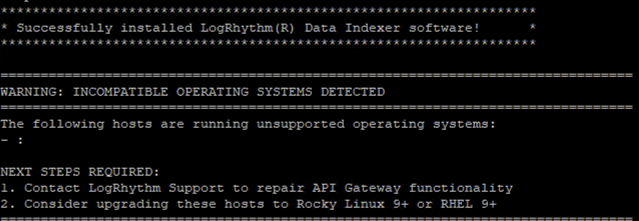
If the host list is not empty, contact LogRhythm Support for additional assistance. |
Expected Results: The “WARNING: INCOMPATIBLE OPERATING SYSTEMS DETECTED” banner should only be displayed if there are hosts detected with incompatible operating systems. Workaround: None needed, ignore the warning if the host list is empty. |
|
ENG-75096 |
7.21 |
Web Indexer |
Following an upgrade from versions prior to 7.20 to 7.21 or higher, some customers are experiencing blank widgets in the Web Console. During the upgrade to 7.21, web indices were migrated to a new Lucene version. Some customers with very large web indices or systems with limited memory may be experiencing “out of memory” (OOM) conditions with the Web Indexer migration tool, or the Web Indexer migration tool window closes before migration finishes. |
Expected Results: Web Indices should be migrated smoothly as part of the upgrade. Workaround Options:
|
|
ENG-35302 |
Multiple |
AI Engine |
Alarm with “not observed” rule block is firing even when a log or multiple logs are present. |
Expected Results: Alarm should not fire if log is present and is within the time window. Workaround: There is currently no workaround for this issue. |
|
ENG-42942 |
Multiple |
Data Indexer |
Data Indexer Investigations on multi-node clusters may produce different result counts when keyword searches are run multiple times. |
Expected Results: All results should be returned each time an investigation is performed. Workaround: Dev binaries are available for testing, please open a support case if you experience this issue. A Fix for this issue will be available in LogRhythm SIEM version 7.24 by providing a configurable search preference for “Fast” or “Precise,” which allows customers to choose their preference for search experience to balance with resources consumed. |
|
ENG-78023
|
Multiple |
Web Console UI |
Environments with multiple web consoles may experience out of sync alarm information displayed in the web console until a status update is made to an alarm. This issue most often occurs following an HA/DR failover event. |
Expected Results: Alarm information should be consistent across all Web Console Instances Workaround: Changing alarm status will trigger a refresh of the alarm details for all web console instances in the deployment |
|
ENG-61278 |
7.19 |
APIs |
After upgrading to LogRhythm SIEM version 7.19, servers running Windows Server 2012 R2 may throw errors when attempting to use the LogRhythm API or connecting through API Gateway. |
Expected Results: The LogRhythm API should function as expected. Workaround: A workaround for this issue has been documented at LogRhythm API Gateway Error on Windows Server 2012 R2. |