
Welcome to the release of LogRhythm SIEM version 7.26! This release focuses on modernizing the platform foundation while expanding automation capabilities and reducing administrative overhead. The Data Indexer has been fully migrated from Elasticsearch 7 to OpenSearch 2, delivering improved security, better performance, and a modern foundation for upcoming product capabilities. Additionally, a new web-based reporting engine, available as a beta in this release, is now embedded in the Web Console, enabling you to create, schedule, and manage reports on log source health, usage auditing, and case management metrics. With this release, the AI Engine REST API gains two new capabilities: programmatic rule creation for end-to-end detection rule automation, and a new performance statistics endpoint for real-time visibility into rule resource consumption. Now, Open Collector Beats operate without heartbeat log sources, simplifying Beat deployments, and four new Beats have also been added this release. Finally, JSON parsing policies for .NET 8 System Monitor Agents can now be centrally managed and automatically distributed by LogRhythm, eliminating manual policy updates across agent deployments. This release also includes enhancements to LogRhythm Echo and the Threat Intelligence Service. With LogRhythm SIEM version 7.26.0, take advantage of a more secure and modern platform, new self-service reporting tools, and a range of enhancements that reduce manual effort and expand automation across your security operations.
What’s new in LogRhythm SIEM 7.26:
Maintenance
Introducing LogRhythm SIEM 7.26.0, Powered by OpenSearch 2!
With LogRhythm SIEM version 7.26, the Data Indexer's underlying search and indexing engine has been fully migrated from Elasticsearch 7 to OpenSearch 2. OpenSearch is an actively maintained, open-source platform derived directly from Elasticsearch, which means your existing indexed data is fully compatible, with no re-indexing required, and no data moved during the upgrade.
The migration also brings a meaningful security improvement: the OpenSearch security plugin is now enabled by default, enforcing TLS encryption and authentication for all internal communications between SIEM services and the search backend. Additionally, this migration makes for a better-performing and more scalable backend, allowing for modern, dashboard-driven reporting and faster search results. Beyond the immediate security and supportability gains, this migration establishes the foundation for upcoming LogRhythm SIEM capabilities.
OpenSearch2 offers significant performance improvements over Elasticsearch 7 including:
-
Up to 5x improvements to query times;
-
50% reduction in merge/refresh operations (improved disk performance);
-
Improved heap memory management with segment memory removed from heap allowing for greater TTL; and
-
Reduced garbage collection pressure using Java 21 reducing CPU consumption for identical workloads.
Upgrading to LogRhythm SIEM version 7.26.0 requires completing the OpenSearch migration as part of the standard upgrade process. Review the Data Indexer ElasticSearch to OpenSearch Upgrades documentation for more information.
A New Reporting Experience with the Beta Reporting Engine
LogRhythm SIEM 7.26 introduces a new, web-based reporting engine embedded directly in the Web Console, giving you the ability to create, schedule, and manage reports without leaving the SIEM interface.
The reporting engine ships with an alarm executive summary report out-of-the-box, provide insights to alarm volume trends. This sample report can be used as-is or customized to fit your environment's specific needs.
Beyond the included reports, you can build entirely custom reports using a visual, drag-and-drop report builder that requires no coding knowledge. Reports can be exported in PDF, CSV, or XLSX formats. All reports are saved to a centralized report library where they can be organized and reused, with full role-based access control integration, ensuring that users only see the data and reports they are permitted to access.
This feature is released as a beta and will be enabled on a controlled basis during the 7.26.0 rollout. The original reporting engine remains available and is unaffected by this release.
For more information, refer to Reporting (Beta).
Centralized JSON Policy Management for System Monitor Agents
Previously, policy files were managed manually as files on disk. Starting with LogRhythm SIEM version 7.26, policies are centrally managed by LogRhythm, versioned, and automatically distributed to the right agents, ensuring every agent is always running the latest parsing rules for the cloud and SaaS log sources it monitors. These policy changes will be recorded on the LogRhythm Community with release notes with every new JSON policy release.
Users upgrading to 7.26.0 .NET 8 System Monitor agents will automatically have their JSON parsing policies updated by the Data Processor upon startup. Users also have the ability to disable this functionality for some or all agents if they would prefer to continue manually updating their JSON policies.
This feature is only available to users of LogRhythm SIEM version 7.26.0 and above who are using .NET8 System Monitor Agents (Windows/Linux).
.NET4 Agents and pre-7.26.0 .NET8 System Monitor Agents continue operating as before and require manual policy management.
For more information, refer to Centralized JSON Policy Management.
New AI Engine API Endpoints
LogRhythm SIEM 7.26 expands the AI Engine REST API with two new capabilities that complete the rule management lifecycle.
Administrators can now create fully formed AIE rules, including top-level rule properties and initial rule block configurations, entirely through the API. Combined with the rule block management endpoints introduced in LogRhythm SIEM version 7.25.0, security teams can automate the complete end-to-end lifecycle of a threat detection rule, from initial creation through ongoing configuration and tuning, with no manual console interaction required. This enables the rollout of new detection rules across client deployments in response to active incidents, and allows security engineering teams to manage their entire threat detection catalog through automated CI/CD pipelines.
A new performance statistics endpoint also provides real-time metrics for any AIE rule, including CPU cost, memory consumption, and current and average event processing rates, data that was previously only accessible through the Windows Client Console. Administrators can integrate these metrics into external monitoring platforms, set up automated alerts for resource-intensive rules, and measure the performance impact of rule tuning changes without leaving a web-based workflow.
For more information, refer to the LogRhythm API Documentation.
Continued AI Engine Drilldown Improvements
LogRhythm SIEM version 7.26 replaces the legacy AIE drilldown with a more reliable, precision-based approach that gives analysts a direct path from an AIE alarm to its exact source logs.
Previously, the drilldown relied on a cache that could be unreliable, pushing analysts into manual searches to reconstruct what triggered an event. In this release, the AIE engine now tracks the specific logs that contributed to each rule firing and stores that information with the resulting AIE event in the Data Indexer. When an analyst clicks the drilldown button in the inspector pane, the system uses those stored references to execute a targeted search and return the exact triggering logs immediately, with no manual query construction required.
For more information on AI Engine drilldown, refer to Perform AI Engine Drill Down Searches.
Enhancements to the Open Collector, Including Four New or Updated Beats
LogRhythm SIEM 7.26 includes two enhancements to the Open Collector platform alongside four new Beats.
Open Collector Beats no longer generate heartbeat messages to indicate operational status. Health monitoring is now handled entirely through the existing Silent Log Source detection feature, which tracks actual log collection activity rather than heartbeat signals. This removes the requirement to configure and maintain a separate log source for each Beat when deploying Beats manually, simplifying the process and reducing log source overhead.
Customers upgrading to the new Beat versions will need to retire their existing heartbeat log sources and enable Silent Log Source detection on each Beat's primary log source. For more information, refer to the Open Collector 2026.10 Release Notes.
Additionally, logs received on the Generic JSON Collector (port 6044) can now parse NDJSON, also known as “pretty-printed JSON”, enhancing the capabilities of this collector and improving diagnostic metadata for logs received over port 6044.
This release also introduces four new or updated Beats for the Open Collector:
-
ChatGPT Enterprise Beat
-
GitHub Enterprise Audit Beat
-
OpenAI Beat
-
Collection of Gemini Enterprise logs through the existing PubSub Beat
For more information on these Open Collector updates, refer to the Open Collector Release Notes.
Proxy Support for the LogRhythm Intelligence Sync Service
The LogRhythm Intelligence Sync Service now supports outbound proxy configuration, enabling LRI functionality in environments where direct internet access is restricted. Proxy host, port, and optional authentication credentials can be configured and will apply to all outbound LRI connections, including alarm synchronization to Nova and the Nova Summary button in the inspector pane.
For more information, refer to LogRhythm Intelligence Sync Service.
LogRhythm System Monitor 7.26.0
Starting with the 7.25.0 release in July 2026, LogRhythm System Monitor release notes have been combined into the main LogRhythm SIEM release notes. Going forward, all release updates for System Monitor can be found here in the LogRhythm SIEM GA release notes.
|
Software Component |
|
|---|---|
|
Version Number |
7.26.0 (Windows) 7.26.0 (*NIX) |
|
Compatibility |
This System Monitor Agent release is compatible with LogRhythm SIEM core versions that have not reached their end of life date. For more information, see End of Life Policies for Software and Hardware.
|
LogRhythm System Monitor Agents for Windows require the Microsoft .NET Framework 4.7.2+ or .NET Core 8.
-
Before upgrading your System Monitor Agent .NET Framework 4 agent (installed pre-7.21), confirm that .NET Framework 4.7.2 or higher is installed.
-
For information on determining which .NET version is installed, see Determine which .NET Framework versions are installed - .NET Framework.
-
If an older version of .NET Framework 4 is installed, install .NET Framework 4.7.2 or higher and reboot your system during a planned maintenance window. Upgrading a .NET Framework 4 agent when the version of .NET Framework is older than 4.7.2 will trigger a reboot.
-
Upgrading existing .NET Framework 4 System Monitor Agents to .NET Core 8 (7.21 or later) should not require a reboot, but should be done during a planned maintenance window.
Centralized JSON Policy Management
Refer to the Centralized JSON Policy Management section above for more information on this feature.
Log Source Enhancements and Updates
LogRhythm SIEM 7.26 introduces updates designed to enhance the speed, consistency, and compatibility of data collection with third-party platforms. These enhancements include:
-
New log sources based on customer requests and feedback.
-
Improvements around Forcepoint log source collection.
New and Updated Log Sources
This past quarter of bi-weekly LogRhythm SIEM Knowledge Base updates included 37 enhanced or improved log sources, and seven newly introduced log sources. This allows customers to expand their security capabilities by increasing log visibility within the LogRhythm SIEM.
The following log sources have been added or updated:
|
New Log Sources |
Updated or Improved Log Sources |
||
|---|---|---|---|
|
|
|
|
Platform Updates
LogRhythm 7.26 is packed with platform updates to improve security, performance, and stability. Spend more time hunting for threats and less time managing the platform.
Dependency Updates
As part of our ongoing commitment to maintaining third-party dependencies for stability and security improvements, the following packages have been updated:
-
Data-Indexer Java Corretto JRE updated to version 11.0.32.10.
-
Web-Indexer Java Corretto JDK updated to version 21.0.12.
-
.NET 8 Core updated to version 8.0.31.
As .NET 8 reaches end of life at the end of 2026, all .NET 8 services will be migrated to .NET 10 with the release of LogRhythm SIEM version 7.27.0 in January 2027.
-
Grafana updated to version 13.1.4.
-
NGINX in Web Console has been updated to 1.30.4.
LogRhythm Echo
LogRhythm Echo was updated to version 2.0.14 with this release of the LogRhythm SIEM. This is a major release of the software which includes numerous enhancements, such as a new least privilege user account, a bulk importer for use cases, and new MITRE ATT&CK use cases, as well as several defect fixes.
For more information on LogRhythm Echo, including information on this new release, refer to the LogRhythm Echo documentation.
LogRhythm Threat Intelligence Service
The LogRhythm Threat Intelligence Service (TIS) was updated to version 2.0.0 with this release of the LogRhythm SIEM. This release of TIS includes bug fixes.
For more information on the Threat Intelligence Service, including information on this new release, refer to the LogRhythm Threat Intelligence Service documentation.
Deprecation Notices
-
Linux System Monitor Agents were moved to .NET 8 in LogRhythm SIEM version 7.23.0. LogRhythm SIEM version 7.24.0 was the last version for which maintenance activities took place against the older builds (versions ending in 1xxx like 7.19.0.1000). Customers should migrate to updated .NET 8 System Monitor Agents for the best, most up-to-date features and defect fixes. The older agents will continue to function; however, maintenance for those agents ceased starting with the 7.24.0 release. Any customers reporting defects with older System Monitor Agents will be asked to migrate to the .NET 8 agent builds (ending in 2xxx like 7.24.0.2000).
-
Linux System Monitor Agents not compatible with .NET 8 (AIX, Solaris, Debian 10, and Ubuntu 18) transitioned to Limited Support with the 7.24.0 release, these agents continue to function but are classified as End of Support Life and will not receive further fixes/patches. Customers can continue to use these agents but should consider alternate log collection options such as syslogd/rsyslog and native auditd functionality.
-
Data Indexer support for CentOS and RHEL 7 ended with LogRhythm SIEM version 7.22. Refer to the Notice of Deprecation section in the LogRhythm SIEM version 7.22.0 release notes for additional details.
Resolved Issues & Improvements
The following issues have been resolved either via a defect fix or a platform improvement in LogRhythm SIEM 7.26.
|
Bug # |
Component |
Description |
|---|---|---|
|
ENG-57635 |
Web Console |
Resolved an issue in which newly created alarms did not appear in the Web Console until their alarm status was changed. |
|
ENG-60622 |
Web Console |
AD-synced accounts with valid extended characters (such as Spanish characters) in their passwords can now log in to the Web Console, and authentication error messaging has been improved to indicate the actual cause of a failure. |
|
ENG-61734 |
Web Console |
The Standard Mandatory DoD Notice and Consent Banner now displays in the Web Console when CAC authentication is configured. |
|
ENG-61898 |
Notification Service |
Batch notification emails now list each alarm only once, with its own distinct alarm ID and separate first and last event times. |
|
ENG-73938 |
Web Console |
Resolved an issue in which log entries were not consistently displayed in the Analyzer grid in multi-Web Console deployments. |
|
ENG-75659 |
Web Console |
An issue in which searching by an MPE Rule Name that had multiple entries returned no results has been resolved. |
|
ENG-81163 |
High Availability (HA) & Disaster Recovery (DR) Deployments |
The HA and DR install and uninstall scripts have been updated to no longer display incorrect warning messages regarding SQL PowerShell modules missing in certain situations. |
|
ENG-81165 |
High Availability (HA) & Disaster Recovery (DR) Deployments |
Resolved an issue in which the HA_DR_Setup.ps1 script could crash when a SQL connection was unavailable or when service accounts were specified in UPN (user@domain) format. |
|
ENG-88451 |
Web Console |
Resolved an issue in which Web Console MegaGrid search results could intermittently disappear when filtering and scrolling in multi-Web Console deployments. |
|
ENG-88781 |
Web Console |
The Web Console Analyzer grid now displays search and drilldown results consistently, and no longer briefly mixes in newly ingested events that self-correct after several seconds. |
|
ENG-88797 |
Web Console |
DX Dashboard widget searches now query only the indexes within the widget's configured timeframe, improving dashboard performance in large environments. |
|
ENG-91952 |
Lists |
List expiration now completes successfully even when a list contains corrupted or invalid items. |
|
ENG-92527 |
Web Console |
New drilldown preference settings ("Widget Drilldowns," "Searches," and "Host and User Detail Searches") have been added so that alarm drilldowns and host and user detail searches now honor the user's open-in-tab or open-in-page preference. |
|
ENG-93233 |
Web Console |
CAC Authentication through the Web Console has been updated to function without requiring a downgrade of API Gateway after upgrading to LogRhythm SIEM version 7.20+. |
|
ENG-97495 |
System Monitor Agents |
Resolved an issue in which upgrading the .NET 8 Linux System Monitor Agent could fail on Rocky Linux 9.x Data Indexer nodes in certain situations. |
|
ENG-98002 |
System Monitor Agents |
The System Monitor Agent JSON parser now detects duplicate LRSchema tags that span both the transforms and subtransforms sections. |
|
ENG-98169 |
Web Console |
Resolved an issue in which the Inspector search filter switched from "ALL OF THE FOLLOWING" (AND) to "ANY OF THE FOLLOWING" (OR) when fields were added using "Add to Search." |
|
ENG-99205 |
System Monitor Agents |
An issue in which the 7.24 .NET 8 Linux System Monitor Agent could crash immediately on startup in certian situations (observed on Ubuntu 24.04) has been resolved. |
|
ENG-99215 |
System Monitor Agents |
Resolved an issue in which Windows XML Security log collection incorrectly produced "not domain object" errors in the scsm.log. |
|
ENG-100003 |
System Monitor Agents |
An issue in which scheduled log source collections (Windows, flat file, etc.) would stop working in certain situations until the agent or data processor was restarted to clear the agent/mediator session has been resolved. |
|
ENG-100076 |
SecondLook API |
The SecondLook API now correctly honors the configured Database Authentication Strategy and uses Windows Authentication when it is set. |
|
ENG-100226 |
System Monitor Agents |
Resolved an issue in which a newly accepted System Monitor Agent required a manual service restart before it would resume heartbeating and load balancing across the Data Processor pool. |
|
ENG-100249 |
Web Console |
An issue in which Web Indexer thread pool exhaustion could freeze the HTTP layer and stop it from accepting requests has been resolved. |
|
ENG-100331 |
AI Engine |
Resolved an issue in which AIE rules configured for Data Segregation by Log Source (Root) Entity aggregated logs from multiple entities into a single alarm instead of firing a separate alarm per entity. |
|
ENG-100339 |
High Availability (HA) Deployments |
The HA install script has been updated to correctly handle Windows Server 2016: new installations under Windows Server 2016 are not supported, but upgrades on systems still using Windows Server 2016 are supported with caveats and callouts. |
|
ENG-100462 |
Log Sources |
Resolved an issue in which removing regex values from a flat file log source's Multiline Log Message Settings did not remove them from scsm.ini. |
|
ENG-100623 |
High Availability (HA) Deployments |
The PreUpgrade.ps1 script now correctly stops when the user responds "No" to a prompt, rather than continuing. |
|
ENG-100724 |
High Availability (HA) & Disaster Recovery (DR) Deployments |
Resolved an issue in which installing the login-propagation troubleshooting stored procedure failed with a "Missing end comment mark" import error. |
|
ENG-100975 |
Web Console |
Web Console case resolution notes no longer HTML-encode quotation marks and now display them as entered. |
|
ENG-101239 |
LR Diagnostics |
The LR Diagnostics Sizing Report diagram now scales dynamically so that Data Processor and AI Engine mappings render correctly in large deployments. |
|
ENG-101298 |
Data Indexer |
The missing 30 GB heap allocation entry has been restored in setValuesForES.bat so that Elasticsearch allocates its full heap on servers with 256 GB or more of RAM. |
|
ENG-101324 |
System Monitor Agents |
The JSON parser policy files shipped with the 7.25 .NET 4 and .NET 8 Windows agents have been reconciled so that identical parsers behave the same across both. |
|
ENG-101835 |
Log Processing Policy |
The Open Collector - Office 365 Management Activity processing policy has been updated to parse shared mailbox logs. |
|
ENG-101893 |
System Monitor Agents |
Resolved an issue in which the 7.24 .NET 4 and .NET 8 System Monitor Agents did not properly cancel and quarantine hung collection tasks, which could leave an agent stuck in a "Stopping" state. |
|
ENG-102107 |
AI Engine |
Resolved an issue in which AIE include and exclude filters created or edited in LogRhythm SIEM version 7.25 did not match as expected in certain situations. |
|
ENG-102139 |
System Monitor Agents |
The System Monitor JSON listener now accepts newline-delimited JSON (NDJSON) records instead of rejecting them, so logs forwarded through Cribl are no longer dropped. |
|
ENG-102142 |
Log Processing Policy |
The Open Collector - Azure Event Hub processing policy has been updated to differentiate resultType 50053 into distinct classifications based on the result description. |
|
ENG-102289 |
Client Console |
Resolved an issue in which the Client Console accepted Entity names containing characters that are illegal in Windows paths, which could cause ArchiveByEntity to fail and consume disk space. |
|
ENG-103156 |
Log Processing Policy |
The Azure AD Sign-In processing policy now correctly parses the useragent field. |
|
ENG-103158 |
Log Processing Policy |
The Azure AD Sign-In processing policy can now populate the login field for service principal, managed identity, and application sign-ins as “alternativeFields”. |
|
ENG-103159 |
Log Processing Policy |
The Azure AD Sign-In processing policy has been expanded to classify 44 Azure AD sign-in error codes. |
|
ENG-103435 |
Alarm API |
Resolved an issue in which the Alarm API returned a 500 error instead of a 401 Unauthorized for an invalid or expired access token. |
|
ENG-103565 |
Archive Engine |
Resolved an issue in which the Archive Engine did not store sealed inactive AI Engine archives in per-entity subfolders when ArchiveByEntity was enabled. |
|
ENG-103851 |
Client Console Admin API |
Resolved an issue with mappings of the Domain (pre 7.4), DomainImpacted, and DomainOrigin fields as they relate to sub-rule matching in MPE and MPE Rule Builder in client console and Admin API. <domain> is now treated as an alias for <domainimpacted> and can be used interchangeably. <domainorigin> is treated as its own independent field. |
|
ENG-103892 |
Log Processing Policy |
The Office 365 processing policies have been updated to parse additional customer-requested fields. |
|
ENG-104141 |
Web Console |
Resolved an issue in which the Threat Center Alarms grid column-width adjustment handles were active through an open Search window, which could close the Search window on a mis-click. |
|
ENG-104280 |
Client Console |
Resolved an issue in which the Client Console could clear an entity host record's Host OS Version (when set to "Other") in certain situations after other fields were edited and saved. |
|
ENG-104494 |
AI Engine |
Resolved an issue in which AIE rules using "Session Type" as a Group By field did not trigger alarms when qualifying logs existed. |
|
ENG-104514 |
Log Processing Policy |
The aws_guard_duty and eventhub_ps_sql JSON policies have been corrected to remove duplicate LRSchema transformations that generated parsing warnings. |
|
ENG-104993 |
Log Processing Policy |
The Box beat JSON policy has been updated to correctly map event and file fields, parse previously unmapped fields, and correct misconfigured file hash and size values. |
|
ENG-105004 |
LR Intelligence Case Sync |
Resolved an issue in which the API_BASE_URL was not being correctly pushed through the console during LR Intelligence Case Sync startup, preventing the service from working in certain situations. |
|
ENG-105005 |
Search API |
Resolved an issue in which the Search API returned a 403 error in certain situations for Restricted Analyst users who had the appropriate permissions. |
|
ENG-105286 |
Log Processing Policy |
The Open Collector - Carbon Black Cloud processing policy now maps process_sha256 as the primary hash field, with parent and threat-cause hashes as fallbacks. |
|
ENG-105368 |
Log Processing Policy |
The o365_dlp_all JSON policy has been corrected to remove a duplicate LRSchema transformation that generated a parsing warning. |
|
ENG-105611 |
AI Engine API |
The AIE API GET and PATCH endpoints now correctly expose and preserve the "REGEX NO CASE" filter mode, consistent with the Client Console. |
|
ENG-106018 |
System Monitor Agents |
The Linux System Monitor Agent install and upgrade scripts now detect all RHEL-based distributions (RHEL, Rocky, CentOS, and AlmaLinux) so that the required libicu dependency is installed. |
|
ENG-106147 |
System Monitor Agents |
The hardcoded 200-connection ceiling for remote event log collection has been removed when HighVolumeRemoteEventLogCollection is enabled, allowing concurrency to scale with CPU core count. |
|
ENG-106347 |
Log Sources |
Restored the ability to edit silent log source configuration on existing child log sources. |
|
ENG-106464 |
AI Engine API |
Resolved an issue in which the AIE API POST /aie/rules endpoint returned a 500 error when creating a rule with syncWithRuleName set to false. |
Resolved Issues - Security
Security-related issues resolved with this release are available for customers to view in the Community.
Known Issues
The following issues have each been found and reported by multiple users.
|
Bug # |
Found In Version |
Components |
Description |
Notes |
|---|---|---|---|---|
|
ENG-105372 |
7.26 |
Data Indexer |
High Availability support for XM Appliances has been delayed for this release, pending a future update to LogRhythm SIEM version 7.26. |
Expected Results: High Availability deployments should be upgraded to version 7.26 as expected. Workaround Options: Postpone upgrades of XM/HA pairs to 7.26 while support for 7.26 XM/HA continues to be developed. If an XM/HA pair is upgraded to 7.26, the primary will continue to function, but the HA will not be able to failover and will need to be left out of service. |
|
ENG-108141 |
7.26 |
Web Console (Reporting Beta) |
Web Console running on a non-default port (TCP/8443) fails to pass traffic to the Beta Reporting Engine. |
Expected Results: Reporting Engine (beta) should follow the same TCP port listener as the Web Console UI and handle traffic forwarding without additional configuration Workaround: Update the Configuration Manager “Superset URL” value to match the custom “SSL Port Number” for your Web Console instance. 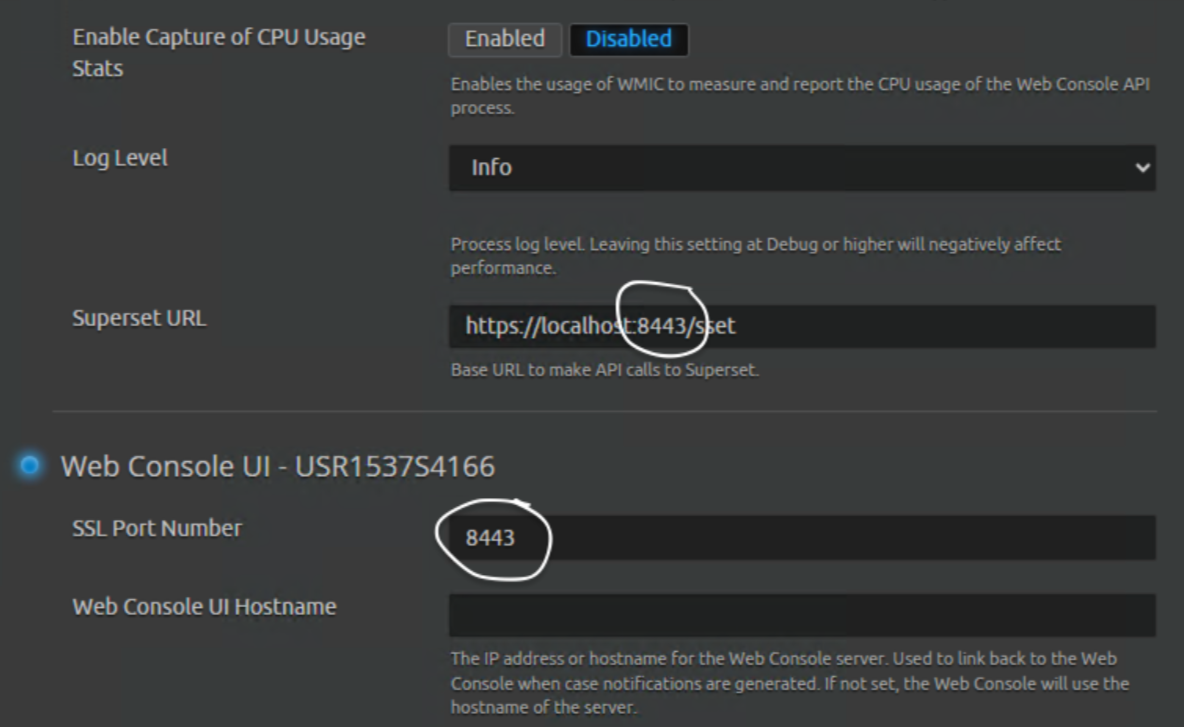
|
|
ENG-108137 |
7.26.2035 |
System Monitor (.NET 8) |
Custom JSON Policies are not processed through .NET 8 System Monitor agents following receipt of centralized JSON policy package from the Data Processor. |
Expected Results: Custom Policies should be processed ahead of system policies, even if they are delivered centrally. Workaround Options:
|
|
ENG-106400 |
7.26 |
Data Indexer |
Linux Data Indexers using custom data path configurations or multi-path may get reset on upgrade. This configuration is rare and has not been officially supported since 7.7 but may exist is some older environments. |
Expected Results: Linux Data Indexers upgrade without resetting. Workaround: From LogRhythm Configuration Manager, find your DX Cluster impacted and reconfigure the custom path after upgrading. Default Path: “/usr/local/logrhythm/db/elasticsearch/data” Example Failure Path: “/usr/local/logrhythm/db/elasticsearch/data,/usr/local/logrhythm/db2/elasticsearch/data” |
|
ENG-105372 |
7.26 |
Data Indexer |
High Availability support for XM Appliances has been delayed for this release. |
Workaround Options: Continue using the previous version of High Availability for now while support for 7.26.0 continues to be developed. |
|
ENG-75096 |
7.21 |
Web Indexer |
Following an upgrade from versions prior to 7.20 to 7.21 or higher, some customers are experiencing blank widgets in the Web Console. During the upgrade to 7.21, web indices were migrated to a new Lucene version. Some customers with very large web indices or systems with limited memory may be experiencing “out of memory” (OOM) conditions with the Web Indexer migration tool, or the Web Indexer migration tool window closes before migration finishes. |
Expected Results: Web Indices should be migrated smoothly as part of the upgrade. Workaround Options:
|
|
ENG-61278 |
7.19 |
APIs |
After upgrading to LogRhythm SIEM version 7.19, servers running Windows Server 2012 R2 may throw errors when attempting to use the LogRhythm API or connecting through API Gateway. |
Expected Results: The LogRhythm API should function as expected. Workaround: A workaround for this issue has been documented at LogRhythm API Gateway Error on Windows Server 2012 R2. |