
The Web Console’s nginx web server is preconfigured to support the TLS_RSA_WITH_AES_256_CBC_SHA cyphersuite with the following default configuration:
ssl_ciphers "FIPS@STRENGTH:!aNULL:!eNULL";
For Common Criteria deployments, however, the Web Console’s nginx web server must be reconfigured to support the TLS_RSA_WITH_AES_128_CBC_SHA cyphersuite by using the following setting in nginx.conf and nginx.conf.ejs:
ssl_ciphers ECDHE-RSA-AES128-SHA;
To reconfigure the Web Console's nginx web server for Common Criteria deployments, perform the following steps:
-
Stop the LogRhythm Web Console UI using the Windows services manager.
-
Using a text editor, open the configuration file nginx.conf (located at C:\Program Files\LogRhythm\LogRhythm Web Services\LogRhythm Web Console UI\dest\conf\nginx.conf).
-
Replace ssl_ciphers "FIPS@STRENGTH:!aNULL:!eNULL"; with the following text:
ssl_ciphers ECDHE-RSA-AES128-SHA;
-
Save and close the nginx.conf file.
-
Using a text editor, open the nginx.conf.ejs file (located at C:\Program Files\LogRhythm\LogRhythm Web Services\LogRhythm Web Console UI\src\nginx\nginx.conf.ejs).
-
Replace ssl_ciphers "FIPS@STRENGTH:!aNULL:!eNULL"; with the following text:
ssl_ciphers ECDHE-RSA-AES128-SHA;
-
Save and close the nginx.conf.ejs file.
-
Restart the LogRhythm Web Console UI using the Windows services manager.
-
Launch the Chrome web browser and open the Web Console Login page.
-
Click the lock icon on the left side of the address bar and verify that the cyphersuite displayed in your browser matches the screen shot below:
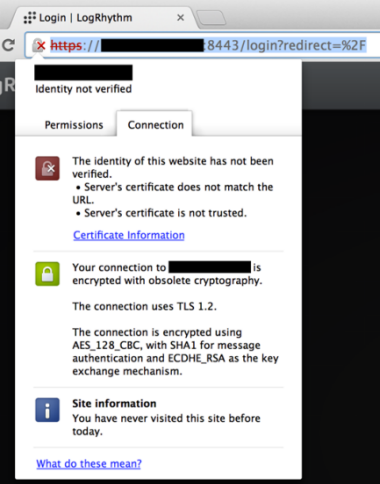
If your browser matches the screen shot, you have successfully configured nginx for a Common Criteria deployment.