
LogRhythm Networking Considerations
There are general guidelines, considerations, and standards to consider prior to deploying your solution within a network. This page covers the networking and communication considerations and requirements to help you deploy your solution.
-
LogRhythm Server IP Addresses. LogRhythm appliances include multiple network interfaces to accommodate different deployment topologies. All IP addresses should be statically assigned or reserved to avoid IP changes. For many topologies, best practice is to use one of the 1Gb interfaces as management and one of the 10Gb interfaces for data.
-
DNS Resolution. It is recommended that the LogRhythm server acting as the Platform Manager be entered into DNS so it is addressable by name.
-
Domain Membership. A LogRhythm server does not need to be a member of the Windows Domain to function correctly. However, LogRhythm recommends adding it to make remote event log collection easier to manage.
-
Remote Event Log Collection User Account. A special user account must be created on the domain for remote event log collection. For more information, see Windows Event Log Collection.
-
Network Address Translation. Network address translation (NAT) cannot be used between core components (AIE, DP, DX, PM, Web). All communications between these components must be real IP to real IP.
LogRhythm components communicate over TCP, UDP, or HTTPS on specific ports. TLS is used when receiving logs at the Data Processor from the LogRhythm System Monitor and also when sending logs from the Data Processor to AI Engine. The diagram below shows the communication between the components and the specific protocols and ports used.
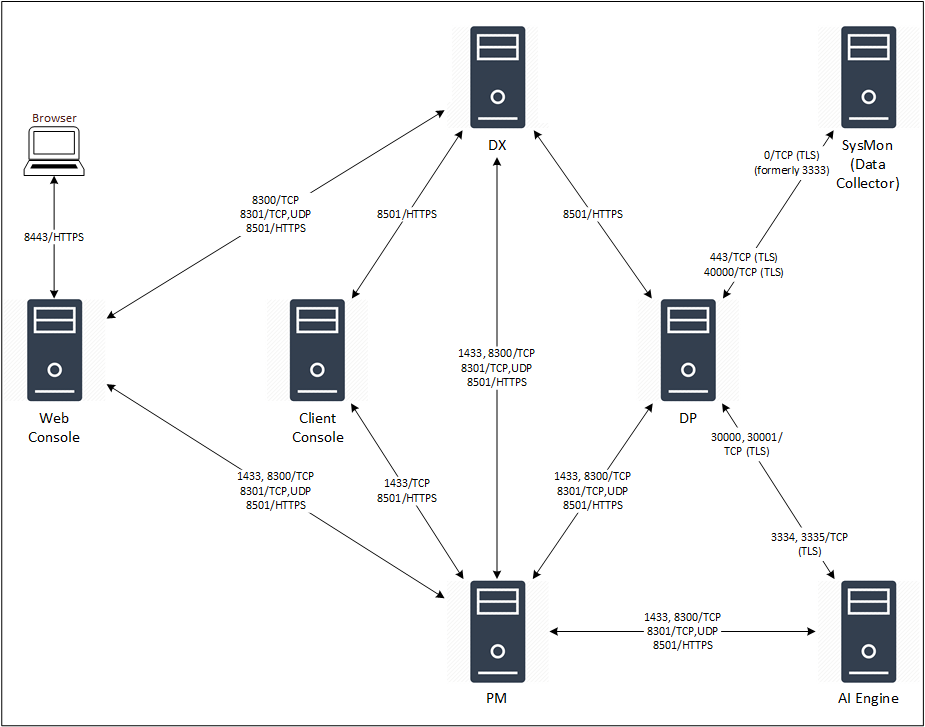
The following tables list all network communications and interactions within a LogRhythm deployment. They can assist system and network administrators with configuration of network access control devices and software.
Components
|
||||
|---|---|---|---|---|
|
Client: AI Engine |
||||
|
Client Port |
Server |
Server Port |
Protocol |
Purpose |
|
8300 |
Platform Manager |
8300 |
TCP |
Incoming RPC requests from client Consul instances |
|
8501 |
Platform Manager |
8501 |
HTTPS |
Auth/config/search requests between API Gateway on AIE and PM |
|
8301 |
Platform Manager |
8301 |
TCP/UDP |
Cluster membership and inter-node communications between Consul instances Port 8301 must be opened for TCP and UDP traffic on all hosts (PM, DP, DX, AIE, Web) in your deployment, with the exception of Client Console and Agent hosts. 8301 is the bi-directional communication port used between all Consul hosts. If the port is blocked, hosts in your deployment will not be able to join the Consul cluster. No log data or customer data is passed between hosts on this port It is only used for membership communication between LR hosts.
|
|
Random |
Platform Manager |
1433 |
TCP |
Configuration details from EMDB on PM |
|
3334, 3335 |
Data Processor |
30000, 30001 |
TCP |
AIE Data Provider on DP forwarding log data to AIE Comm Manager |
|
Client: Client Console |
||||
|
Client Port |
Server |
Server Port |
Protocol |
Purpose |
|
8501 |
Data Indexer |
8501 |
HTTPS |
Auth/config/search requests between API Gateway on Console and DX |
|
8501 |
Platform Manager |
8501 |
HTTPS |
Auth/config/search requests between API Gateway on Console and PM |
|
Random |
Platform Manager |
1433 |
TCP |
Console SQL Server access to PM EMDB |
|
Client: Common Components |
||||
|
Client Port |
Server |
Server Port |
Protocol |
Purpose |
|
Random |
Metrics Database (InfluxDB) |
8076 |
TCP |
Persistence layer for time-series metrics |
|
Random |
Metrics Collection (Telegraf) |
8125 |
TCP |
|
|
Random |
Metrics Web UI (Grafana) |
3000 |
TCP |
User interface for viewing and exploring metrics |
|
Client: Data Indexer |
||||
|
Client Port |
Server |
Server Port |
Protocol |
Purpose |
|
Random |
Platform Manager |
1433 |
TCP |
DX SQL Server access to PM EMDB |
|
8501 |
Platform Manager |
8501 |
HTTPS |
Auth/config/search requests between API Gateway on DX and PM |
|
8300 |
Platform Manager |
8300 |
TCP |
Incoming RPC requests from client Consul instances |
|
8301 |
Platform Manager |
8301 |
TCP/UDP |
Cluster membership and inter-node communications between Consul instances Port 8301 must be opened for TCP and UDP traffic on all hosts (PM, DP, DX, AIE, Web) in your deployment, with the exception of Client Console and Agent hosts. 8301 is the bi-directional communication port used between all Consul hosts. If the port is blocked, hosts in your deployment will not be able to join the Consul cluster. No log data or customer data is passed between hosts on this port. It is only used for membership communication between LR hosts.
|
|
Client: Data Processor |
||||
|
Client Port |
Server |
Server Port |
Protocol |
Purpose |
|
8501 |
Data Indexer |
8501 |
HTTPS |
Auth/config/search requests between API Gateway on DP and DX |
|
Client: LR API |
||||
|
Client Port |
Server |
Server Port |
Protocol |
Purpose |
|
Random |
Platform Manager |
1433 |
TCP |
Bidirectional connection between LR API and PM |
|
Client: LR KB Update |
||||
|
Client Port |
Server |
Server Port |
Protocol |
Purpose |
|
N/A |
Platform Manager |
80, 443 |
TCP |
Bidirectional connection for KB updates |
|
Client: Open Collector |
||||
|
Direction |
Source > Destination |
Server Port |
Protocol |
Purpose |
|
Outbound |
Open Collector > |
443 |
HTTPS |
Identify latest container versions This is only used during an installation or upgrade of the Open Collector.
|
|
Outbound |
Open Collector > |
443 |
HTTPS |
Download latest Open Collector software This is only used during an installation or upgrade of the Open Collector.
|
|
Outbound |
Open Collector > Windows System Monitor Agent |
514 |
HTTPS |
Syslog feed of data to LogRhythm SIEM |
|
Inbound |
User Machine > Open Collector |
3000 |
HTTP |
View Open Collector metrics in Grafana |
|
Inbound |
User Machine > Open Collector |
22 |
SSH |
Interact with Open Collector |
|
Client: Platform Manager |
||||
|
Client Port |
Server |
Server Port |
Protocol |
Purpose |
|
8300 |
Data Processor |
8300 |
TCP |
Incoming RPC requests from client Consul instances |
|
8301 |
Data Processor |
8301 |
TCP/UDP |
Cluster membership and inter-node communications between Consul instances Port 8301 must be opened for TCP and UDP traffic on all hosts (PM, DP, DX, AIE, Web) in your deployment, with the exception of Client Console and Agent hosts. 8301 is the bi-directional communication port used between all Consul hosts. If the port is blocked, hosts in your deployment will not be able to join the Consul cluster. No log data or customer data is passed between hosts on this port. It is only used for membership communication between LR hosts.
|
|
8501 |
Data Processor |
8501 |
HTTPS |
Auth/config/search requests between API Gateway on DP and PM |
|
Random |
Data Processor |
1433 |
TCP |
DP SQL Server access to PM EMDB |
|
Client: System Monitor/Data Collector Agents communicate with Data Processors via a secure, proprietary TCP-based application protocol. Communications are encrypted with TLS using either unilateral or bilateral authentication. The TCP port Agents send data from, and the TCP port Data Processors listen on, is user configurable.
|
||||
|
Client Port |
Server |
Server Port |
Protocol |
Purpose |
|
0 (formerly 3333) |
Data Processor |
40000 |
TCP |
Forwards raw log data to the DP when running in Unidirectional Agent mode
|
|
0 (formerly 3333) |
Data Processor |
443 |
TCP |
Forwards raw log data to the DP when running in Bidirectional Mode |
|
Client: Web Browser |
||||
|
Client Port |
Server |
Server Port |
Protocol |
Purpose |
|
Random |
Web Console |
8443 |
HTTPS |
The SSL port to use for accessing the Web Console. |
|
Client: Web Console |
||||
|
Client Port |
Server |
Server Port |
Protocol |
Purpose |
|
8300 |
Platform Manager |
8300 |
TCP |
Incoming RPC requests from client Consul instances |
|
8501 |
Platform Manager |
8501 |
HTTPS |
Auth/config/search requests between API Gateway on Web and PM |
|
8501 |
Data Indexer |
8501 |
HTTPS |
Auth/config/search requests between API Gateway on Web and DX |
|
Random |
Platform Manager |
1433 |
TCP |
Web Console SQL Server access to PM Events DB. |
|
8301 |
Platform Manager |
8301 |
TCP/UDP |
Cluster membership and inter-node communications between Consul instances Port 8301 must be opened for TCP and UDP traffic on all hosts (PM, DP, DX, AIE, Web) in your deployment, with the exception of Client Console and Agent hosts. 8301 is the bi-directional communication port used between all Consul hosts. If the port is blocked, hosts in your deployment will not be able to join the Consul cluster. No log data or customer data is passed between hosts on this port. It is only used for membership communication between LR hosts.
|
|
43 |
WHOIS |
43 |
TCP |
Run a whois query using contextualization |
|
Client: Web Console Case API |
||||
|
Client Port |
Server |
Server Port |
Protocol |
Purpose |
|
† |
† |
† |
† |
The Web Console Case API uses dynamic ports in the range of 20000-30000. These are listening ports used for loopback purposes and do not require any firewall changes.
|
|
Client: TrueIdentity Sync Client |
||||
|
Client Port |
Server |
Server Port |
Protocol |
Purpose |
|
389 |
AD Server |
389 |
LDAP |
TrueIdentity Sync Client access to the LDAP server |
|
636 |
AD Server |
636 |
LDAP |
TrueIdentity Sync Client access to the secure LDAP server |
|
8505 (local requests) |
Admin API, Platform Manager |
8505 (local requests) |
HTTPS |
Connection to the Admin API |
|
8501 (remote requests) |
Admin API, Platform Manager |
8501 (remote requests) |
HTTPS |
Connection to the Admin API |
Notifications and Alerts
|
|||||
|---|---|---|---|---|---|
|
Client |
Client Port |
Server |
Server Port |
Protocol |
Purpose |
|
LogRhythm Platform Manager and Web Console |
Random |
SMTP Server |
25 |
TCP |
Unidirectional, Client Initiated |
|
LogRhythm Platform Manager |
Random |
SNMP Manager |
162 |
UDP |
Unidirectional, Client Initiated |
|
LogRhythm Platform Manager |
** |
McAfee ePO Server |
** |
** |
** LogRhythm alarms are forwarded to EPO via the McAfee agent installed on a Platform Manager. To determine the ports utilized by McAfee agents and EPO server, see your McAfee ePO documentation and configuration.
|
Devices Sending Logs
|
|||||
|---|---|---|---|---|---|
|
Client |
Client Port |
Server |
Server Port |
Protocol |
Purpose |
|
UDP Syslog Device |
Random |
LogRhythm Agent |
514 |
UDP |
Unidirectional |
|
TCP Syslog Device |
Random |
LogRhythm Agent |
514 |
TCP |
Unidirectional |
|
NetFlow v1, v5 or v9 Device |
Configurable |
LogRhythm Agent |
5500 |
UDP |
Unidirectional |
|
IPFIX Device |
Configurable |
LogRhythm Agent |
5500 |
UDP |
Unidirectional |
|
J-Flow Device |
Configurable |
LogRhythm Agent |
5500 |
UDP |
Unidirectional |
|
sFlow Device |
Configurable |
LogRhythm Agent |
6343 |
UDP |
Unidirectional |
|
SNMP Trap Device |
Configurable |
LogRhythm Agent |
161 |
UDP |
Unidirectional |
Remote Log Collection
|
|||||
|---|---|---|---|---|---|
|
Client |
Client Port |
Server |
Server Port |
Protocol |
Purpose |
|
LogRhythm Agent |
Random |
Windows Host (Windows Event Logs) |
135, 137, 138, 139,445 |
TCP/RPC |
Bidirectional, Client Initiated |
|
LogRhythm Agent |
Random |
Database Server (UDLA) |
DB Server dependent The server port for UDLA collection will vary based on the database server being queried. (SQL Server default = TCP 1433; MySQL default 3306; Oracle default = TCP 1521; DB2 default = TCP 50000)
|
TCP/ODBC |
Bidirectional, Client Initiated |
|
LogRhythm Agent |
Random |
Check Point Firewall |
18184 |
TCP/OPSEC LEA |
Bidirectional, Client Initiated |
|
LogRhythm Agent |
Random |
Cisco IDS (SDEE) |
443 |
TCP/HTTPS |
Bidirectional, Client Initiated |
|
LogRhythm Agent |
Random |
Nessus Server |
8834 |
TCP/HTTPS |
Bidirectional, Client Initiated |
|
LogRhythm Agent |
Random |
Qualys Server |
443 |
TCP/HTTPS |
Bidirectional, Client Initiated |
|
LogRhythm Agent |
Random |
Metasploit Server |
3790 |
TCP/HTTPS |
Bidirectional, Client Initiated |
|
LogRhythm Agent |
Random |
Nexpose Server |
3780 |
TCP/HTTPS |
Bidirectional, Client Initiated |
|
LogRhythm Agent |
Random |
Retina Server |
1433 |
TCP/ODBC |
Bidirectional, Client Initiated |
|
LogRhythm Agent |
4444 |
eStreamer Server |
8302 |
TCP/HTTPS |
Bidirectional, Client Initiated |
Data Indexer - Inbound Ports
|
|||||
|---|---|---|---|---|---|
|
Appliance |
Protocol |
Inbound Port |
Received From... |
Operating System |
Purpose |
|
PM - Disaster Recovery |
TCP |
5022 |
Inter-node Disaster Recovery communication |
Windows |
Port used for replication requests in Disaster Recovery deployments |
|
PM - SQL |
TCP |
1433 |
Carpenter and Bulldozer on DX |
Windows & Linux |
SQL Server access to EMDB |
|
LogRhythm API Gateway |
HTTPS |
8501 |
API Gateway |
Windows & Linux |
Enables secure, load balanced, and discoverable service to service communication. Required to use the JWT from the Authentication API. |
|
Consul |
TCP/UDP |
8300, 8301 |
Service Registry |
Windows & Linux |
Establishes a secure cluster between the LogRhythm hosts in a deployment, not including agents |
Data Indexer - Local Ports
|
|||||
|---|---|---|---|---|---|
|
Service |
Protocol |
Port |
Direction |
Operating System |
Purpose |
|
Columbo |
TCP |
13131, 13133 |
DX Local Only |
Windows & Linux |
Columbo internal processing |
|
Consul |
TCP/UDP |
8300, 8301 |
Inter-node |
Windows & Linux |
Nodes in cluster sharing keys |
|
8500 |
DX Local Only |
Windows |
Consul administration dashboard |
||
|
Elasticsearch |
TCP |
9200 |
DX Local Only |
Windows & Linux |
Curl queries to Elasticsearch |
|
9300-9400 |
Inter-node |
Linux |
Replication and federation across nodes |
||
Open Collector
|
|||||
|---|---|---|---|---|---|
|
Direction |
Port |
Protocol |
Source |
Destination |
Purpose |
|
Outbound |
443 |
HTTPS |
Open Collector |
|
Identify latest container versions This is only used during an installation or upgrade of the Open Collector.
|
|
Outbound |
443 |
HTTPS |
Open Collector |
|
Download latest Open Collector software This is only used during an installation or upgrade of the Open Collector.
|
|
Inbound |
3000 |
HTTP |
User machine |
Open Collector |
View Open Collector metrics in Grafana |
|
Inbound |
22 |
SSH |
User machine |
Open Collector |
Interact with Open Collector |
|
Outbound |
514 |
HTTPS |
Open Collector |
Windows System Monitor Agent |
Syslog feed of data to LogRhythm SIEM |
Beats
|
|||||
|
Direction |
Port |
Protocol |
Source |
Destination |
Purpose |
|
Outbound |
443 |
HTTPS |
Beats |
|
Collection from any active beat: Azure Event Hub, AWS S3, Gmail Message Tracking, GSuite, Pub/Sub, Sophos Central |
|
Outbound |
5671 |
AMQPS |
Event Hub Beat |
|
Azure collection from Event Hub |
Unidirectional Agent Communication
LogRhythm provides support for secure transmission from an unclassified server to a top secret server. The System Monitor Agents support unidirectional communication without receiving any control or data transmissions from the Data Processor or Platform Manager. The table below shows the unidirectional communication from the Agent(s) within the unclassified sector to the Data Processor within the top secret sector.
|
|||||
|---|---|---|---|---|---|
|
Client |
Client Port |
Server |
Server Port |
Protocol |
Commnunications |
|
LogRhythm Agent |
3333 |
LogRhythm Data Processor |
40000 |
TCP |
Unidirectional |
|
Web Console Client |
Random |
LogRhythm Web Server |
8443 |
HTTPS |
Bidirectional, Client Initiated |
|
Web Console Client |
Random |
Data Indexer |
13130, 13132 |
TCP |
Bidirectional, Client Initiated |