
Prerequisites
-
The Open Collector is installed. If you have not already installed it, follow the instructions in the Open Collector Installation and User Guide, and then return to this topic.
-
A Client Secret ID and Client Secret Value is generated to provide the configuration keys.
-
Configure your firewall to allow all traffic from: login.microsoftonline.com
-
The following port is open:
Direction
Port
Protocol
Source
Outbound
443
HTTPS
msgraphbeat
Initialize the Beat
-
Confirm the Open Collector is running by entering the following command:
Bash./lrctl statusYou should see the open_collector and metrics as shown in the following graphic:

If the Open Collector is not running correctly, see Troubleshoot the Open Collector in the Open Collector Installation and User Guide.
-
In the Open Collector, run the following command:
Bash./lrctl msgraphbeat start
-
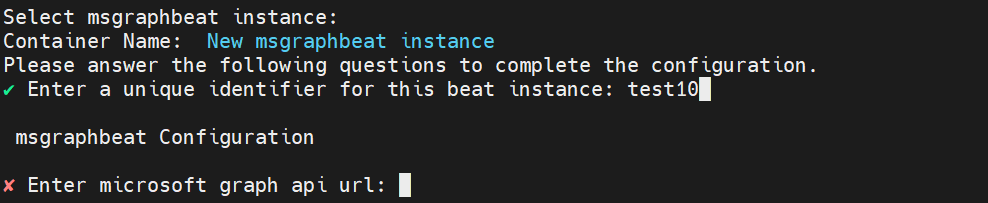
Enter a unique identifier for the beat instance and press Enter.
-
Enter one of the following Microsoft Graph API URLs, depending on the endpoint being configured, and then press Enter:
-
graph.microsoft.com/v1.0/auditLogs/directoryAudits
-
graph.microsoft.com/v1.0/auditLogs/signIns
-
graph.microsoft.com/v1.0/security/alerts
-
graph.microsoft.com/v1.0/security/alerts_v2
-
-
Enter the Microsoft Graph API Client ID, which was obtained as the Application ID in Configure Microsoft Graph API, and then press Enter.

-
Enter the Microsoft Graph API Client Secret, which was obtained as the Secret Value when creating a Client Secret in Configure Microsoft Graph API, and then press Enter.

-
Enter the Microsoft Graph API Tenant ID, and then press Enter.

-
Enter the number of records that the Microsoft Graph API beat should fetch, and then press Enter.

The configuration has been saved and the service has been started successfully. -
(Optional.) To check the status of the service, enter the following command:
Bash./lrctl msgraphbeat status
The Microsoft Graph API beat gathers logs through all three of the endpoints mentioned above, and sends the data to the output configured in the beat's config.yaml file. The beat adds the appropriate date and time filter to get the latest and most relevant data, and sends it ahead in the pipeline.
Default Config Values for the Microsoft Graph API Beat
|
S. No. |
Field Name |
Default Value |
|---|---|---|
|
1. |
client_id |
User-provided |
|
2. |
client_secret |
User-provided |
|
3. |
msgraphURL |
User-provided |
|
4. |
tenant_id |
User-provided |
|
5. |
top (number of records to fetch) |
User-provided |
|
6. |
heartbeatdisabled |
false |
|
7. |
heartbeatinterval |
60 |
|
8. |
limit |
1000 |
|
9. |
numbackdaysData |
7 |
|
10. |
period |
2s |
|
11. |
top |
100 |
|
12. |
delayTimeSec |
600 |