
Import Docker Images for an Offline Installation of the Cisco AMP Beat
To install docker images, which allows for Open Collector to operate offline, do the following:
Remove the previous versions.yml file if one exists.
BASHrm -f versions.ymlDownload and copy all of the artifacts below to the virtual machine.
S. No. Component Link Checksum 1 lrclt lrctl_6_4_0.tar lrctl_6_4_0.tar.sha256 2 open-collector opencollector_5_5_4.tar opencollector_5_5_4.tar.sha256 3 ciscoampbeat ciscoampbeat_6_1_4.tar ciscoampbeat_6_1_4.tar.sha256 4 metrics metrics_6_0_1.tar metrics_6_0_1.tar.sha256 5 versions.yml versions.yml versions.yml.sha256 6 lrctl(script) lrctl_script lrctl_script.sh.sha256 7 alpine Alpine.tar alpine.tar.sha256 8 docker 20.10.8 docker_20_10_8.tar.gz docker_20_10_8.tar.sha256 Before extracting the .tar files into docker images, the Docker must be installed.
If the Docker is already installed, skip to step 6.
Extract docker_20_10_8.tar.gz:
BASHtar xzvf /path/to/docker_20_10_8.tar.gzMove the binaries to /usr/bin/:
BASHcp docker/* /usr/bin/Start the Docker Daemon:
BASHdockerd &Before downloading the artifacts, remove any running container(s) and the images related to that container.
To stop all the running components, run the following command:
BASHdocker rm -f $(docker ps -aq)Next, remove all the docker images in the system:
BASHdocker rmi -f $(docker images -aq)
To extract a docker image from a .tar file, use the following command:
BASHdocker load < <image-name>.tar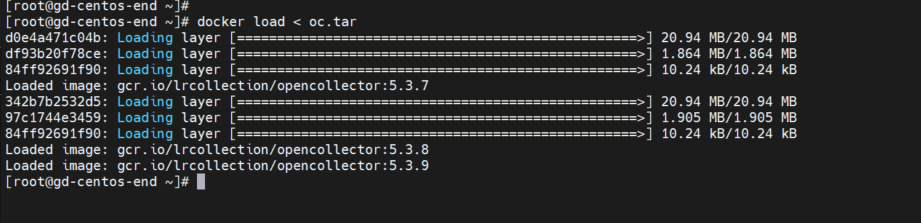
- Repeat step 7 to extract any additional .tar files.
- Place lrctl and versions.yml in the same folder.
Execute this command after step 9.
BASH./lrctl autoupdate disable

Use "-V versions.yml" with every command while working with the beat.
./lrctl -V versions.yml ciscoampbeat startOnce all the .tar files have been extracted, start the Open Collector and Cisco AMP Beat as normal by following the steps at .Initialize the Cisco AMP Beat v2021.10.