
Import Docker Images for an Offline Installation of Open Collector
To install docker images, which allows for Open Collector to operate offline, do the following:
Remove the previous versions.yml file if one exists.
BASHrm -f versions.ymlDownload and copy all the artifacts below to the virtual machine.
S. No. Component Link Checksum 1 lrclt lrctl_6_4_0.tar lrctl_6_4_0.tar.sha256 2 open-collector opencollector_5_5_4.tar opencollector_5_5_4.tar.sha256 3 metrics metrics_6_0_1.tar metrics_6_0_1.tar.sha256 4 versions.yml versions.yml versions.yml.sha256 5 lrctl(script) lrctl_script lrctl_script.sh.sha256 6 alpine Alpine.tar alpine.tar.sha256 7 docker 20.10.8 docker_20_10_8.tar.gz docker_20_10_8.tar.sha256 8 ocpipeline ocpipeline_5_1_6.tar ocpipeline_5_1_6.tar.sha256 9 lrjq lrjq_5_1_3.tar lrjq_5_1_3.tar.sha256 Before extracting the .tar files into docker images, the Docker must be installed.
If the Docker is already installed, skip to step 6.
Extract docker_20_10_8.tar.gz:
BASHtar xzvf /path/to/docker_20_10_8.tar.gzMove the binaries to /usr/bin/:
BASHcp docker/* /usr/bin/Start the Docker Daemon:
BASHdockerd &Before downloading the artifacts, remove any running container(s) and the images related to that container.
To stop all running components, run the following command:
BASHdocker rm -f $(docker ps -aq)Next, remove all the docker images in the system:
BASHdocker rmi -f $(docker images -aq)
To extract a docker image from a .tar file, use the following command:
BASHdocker load < <image-name>.tar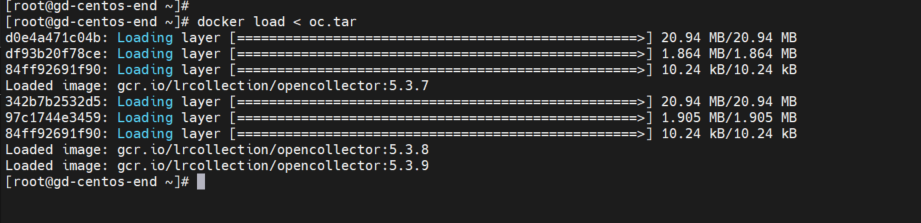
- Repeat step 7 until all .tar files are extracted.
- Place lrctl and versions.yml in the same folder.
Execute this command after step 9.
BASH./lrctl autoupdate disable

Use "-V versions.yml" with every command while working with the Open Collector.
./lrctl -V versions.yml oc startOnce all the .tar files have been extracted, Open Collector can be started and used as normal.